Frequently asked questions
Answers about your Google Sheets template or Excel download, custom builds, and what the templates are and aren’t.
Your Google Sheets template and Excel download
Where do I find my downloads?
Download links are on the order confirmation page, in the order email and under My account → Downloads.
I bought a Google Sheets template, but it’s “View only”. How do I edit it?
The Google Sheets link opens the original file in “View only” mode. To edit it, make your own copy:
- Click File, then Make a copy.
- Enter a name for your file.
- Click the Make a copy button.
Your copy is fully editable. There’s no need to request edit access to the original file, and you can make as many copies as you like for yourself.
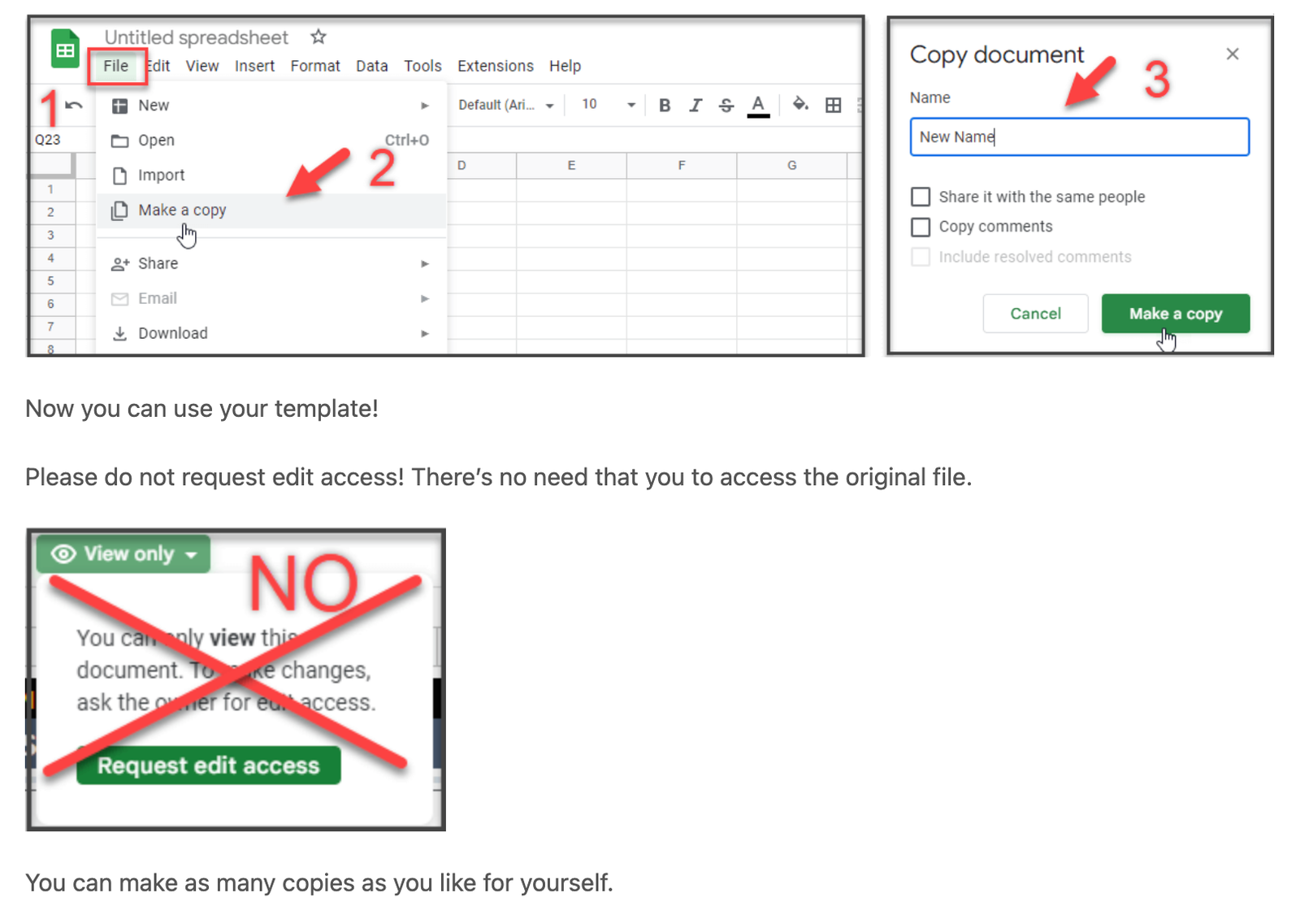
 Video: how to make a copy of a “View only” Google Sheets template (on YouTube)
Why did I get a PDF file? Where is the Google Sheets template?
Google Sheets is an online tool, so the template is delivered as a PDF file that holds the access link. This keeps the link from breaking.
- Open the PDF file you downloaded.
- Find the CLICK HERE button.
- Click it to open your Google Sheets template.
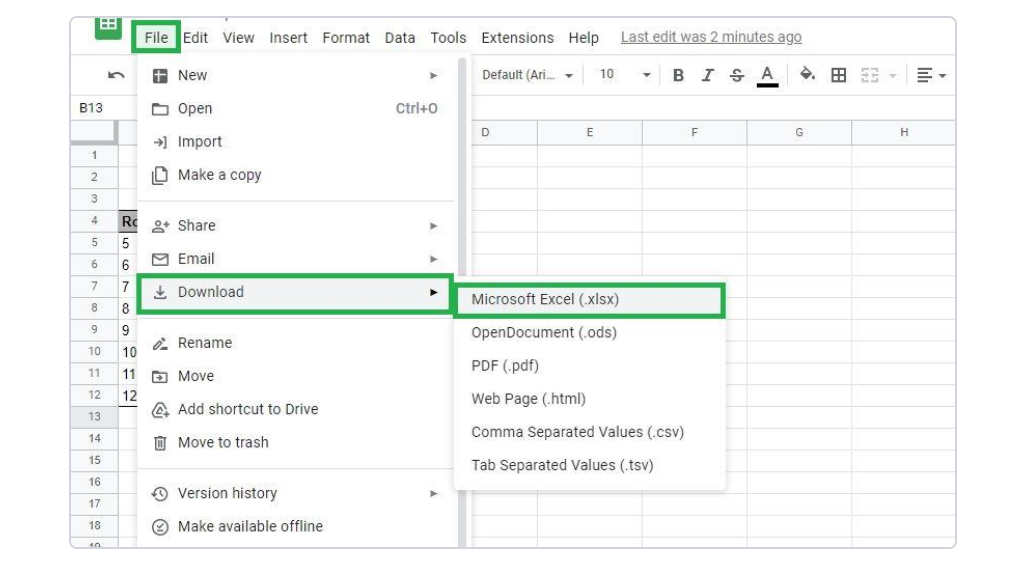
My template works in Excel. How do I download the Google Sheets file to Excel?
In Google Sheets, click File, then Download, then Microsoft Excel (.xlsx).
Are the spreadsheets password-protected?
No. The spreadsheets aren’t locked or password-protected. They’re fully editable.
Custom builds and customization
What’s the difference between customization and a custom build?
Customization is a targeted change to an existing template, such as added fields, formulas, automation or small layout changes.
A custom build is a system designed around one business’s workflow. It can include new structures, advanced automation, integrations or reporting built from the ground up.
What do customization and custom builds cost?
Fees depend on the scope, complexity and time each request needs. You receive a quote with the scope and cost before any work starts.
- Spreadsheet custom builds start at $500.
- Apps are quoted per project.
- Training and support, beyond what is included with a template or custom build (for example, training your staff): $75 per hour.
- Maintenance and troubleshooting: $150 per hour, or $250 per hour for priority requests.
Is the first meeting free?
Yes, the first 30-minute Google Meet is free. Book a free call at a time that suits you. A card is saved when you book. Cancelling or rescheduling at least 24 hours before the call is free. A $25 fee may be charged to the card for calls cancelled less than 24 hours before, missed without notice, or not joined within 10 minutes of the start time.
Advice, accuracy and refunds
Do you provide accounting, tax or financial advice?
No. EverReachCraft sells tools: spreadsheet templates, custom systems and the RiggiTruckBooks app.
EverReachCraft templates and systems are tools for organizing, calculating, and presenting the data you enter. Although they are designed by a licensed CPA, they do not constitute accounting, tax, legal, investment, or other professional advice, and purchasing or using them does not create a CPA-client or other professional-client relationship.
Training, troubleshooting, and custom work are limited to the design, setup, use, and functionality of EverReachCraft systems. They do not constitute accounting, tax, legal, investment, or other professional advice and do not create a CPA-client or other professional-client relationship.
Are the results guaranteed?
No. Products are provided “as is” without warranties or guarantees of accuracy, completeness, suitability, or results. Outputs depend on the information entered and how the product is used. You are responsible for reviewing your inputs, verifying calculations and results, and determining whether a product is appropriate for your needs.
Can I get a refund?
All sales are final, with one limited exception in the Terms of Service. A refund may be issued for an unmodified template that materially fails to work as described in its product listing, when:
- the issue is reported within 7 days of purchase,
- details are provided and troubleshooting is completed together, and
- EverReachCraft determines the issue isn’t caused by user error, a system incompatibility not stated in the listing, changes by Google or Microsoft, or changes made to the template.
Each product page shows what the template includes, with screenshots and demo videos. Questions about a template can be sent through the contact form before or after purchase. Details are in the Terms of Service.