

App · For home buyers
Home Comparison Calculator
Home Comparison Calculator compares up to three houses side by side on iPhone, iPad and Android phones: the cash to move in, the monthly cost today and in 5 years, and the all-in cost of each one.


Free to try · $4.99 one-time unlock · No subscription · No account
A lower price doesn’t always mean a lower cost
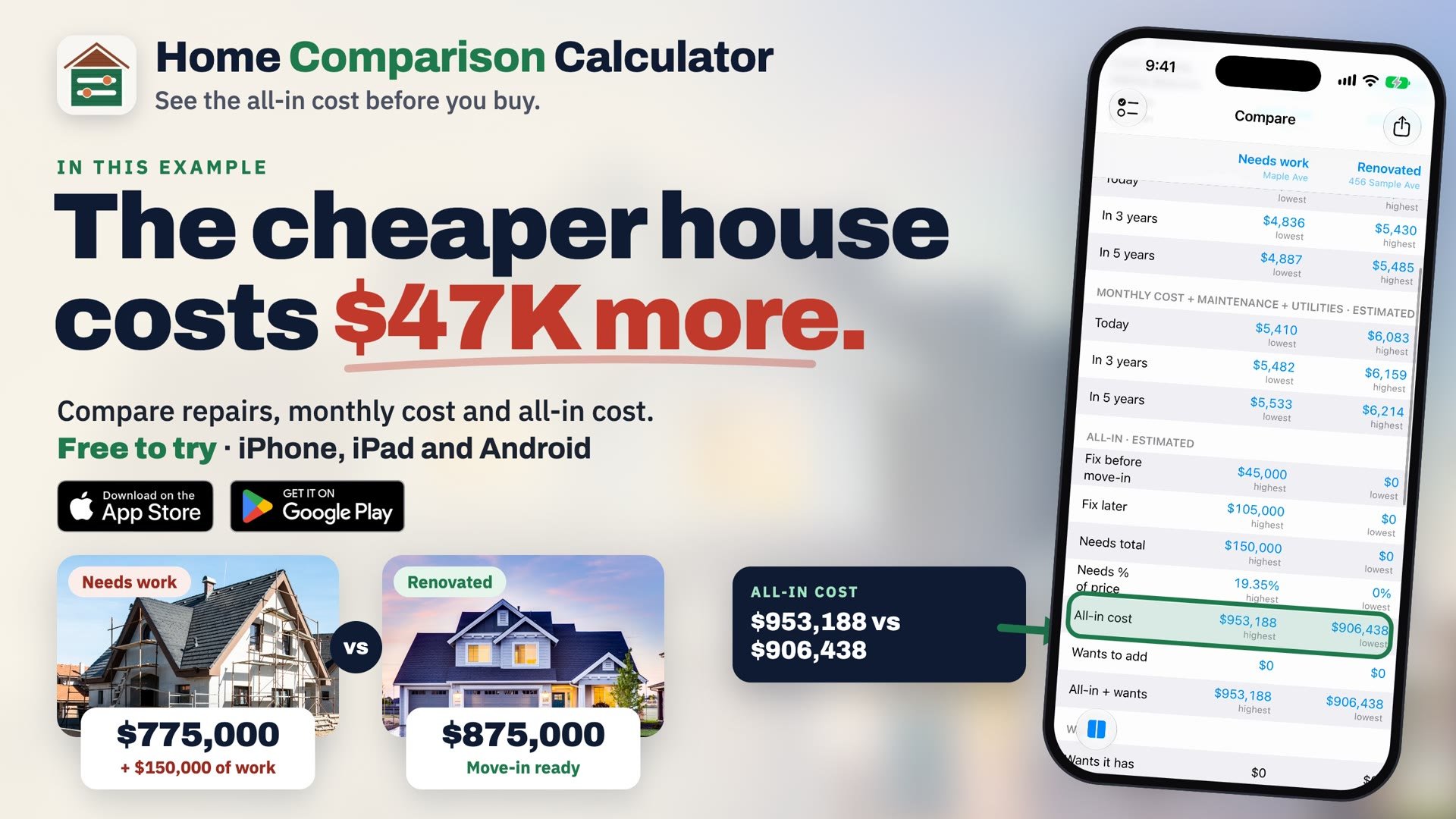
Houses are usually compared by price. But a house that needs work costs its price plus the work. Take a house listed at $775,000 that needs $150,000 of renovation, some right away and some over the next few years, and a fully renovated house listed at $875,000:
Needs work
Price $775,000
Renovation, now and later + $150,000
Real cost $925,000
Already renovated
Price $875,000
Renovation $0
Real cost $875,000
The house that looks $100,000 cheaper costs $50,000 more.
Repairs, counted in
Repairs are easy to set aside during a showing, when attention goes to the layout, the light and the neighborhood. The app keeps two repair lists for each house, “fix before move-in” and “can wait”, and adds them into the cash to move in and the all-in cost.
What a renovation can’t add
Some things can’t be added at any price: the location, the school district, the lot or the view. When one house has something the other can’t match, the app shows exactly how much more it costs to get it.
Worked example with three sample houses: How to Compare Houses Side by Side.
See it in 37 seconds
The $775,000 house that needs $150,000 of work, next to the $875,000 renovated one, and how Home Comparison Calculator lays out the real cost of each house.
What the video shows
- “Does the cheaper house really cost less?” A house that needs work, listed at $775,000, and a renovated house, listed at $875,000.
- $150,000 of repairs is added to the first house, and its cost becomes $925,000: the cheaper one costs $50,000 more.
- “See what each house really costs”: Home Comparison Calculator adds up price, repairs, closing costs and monthly costs, side by side.
- The app, with sample houses: adding a house, comparing three houses, repairs and upgrades, monthly cost today and in years 3 and 5, the formula behind a number, must-haves and deal-breakers, and the PDF report.
- “Buying a home is emotional. The math doesn’t have to be.” Free to try on the App Store and Google Play.
The video has music and no speech. App screens show sample data.
Watch the full walkthrough
In 4½ minutes: setting up, repairs, cash to move in, monthly cost and its formulas, pros and cons, the all-in comparison and the PDF report, with the same two houses.
Watch on YouTube (captions available) · Audio described version
Read the transcript (with on-screen text)
[On screen, before the narration: In this example, the cheaper house costs $46,750 more all-in. $775,000 plus $150,000 of work: all-in $953,188. $875,000 renovated: all-in $906,438.]
Hi, in this video, I want to share with you a home calculator app I built called the Home Comparison Calculator. I built it because buying a home is a very emotional process, and sometimes we don't look closely at the numbers. We tend to go for the cheapest house, and the cheapest house can sometimes end up costing more. This app puts the number in front of you, so the decision can be made with numbers. It makes you look at each house more analytically, and it has pros and cons for each house, so you can see the tradeoffs, and decide whether a house is worth paying more for.
So let me show you how it works. Here are two houses. The first one is listed at $775,000, but it needs about $150,000 of work. The second one is $875,000, and it is already renovated. On price alone, the first house looks cheaper. Let's see what the numbers say.
So first, I set my loan once, in the profile, the down payment, the interest rate, and the loan term. These apply to every house. Then I add a house. I tap the plus, type the address, and enter the list price. On the iPhone and iPad, the address can be picked from suggestions as you type. And on the house detail tab, I add the property tax, the insurance, HOA dues if there's any, and then the closing cost. You don't need an account, and everything you enter stays on your device.
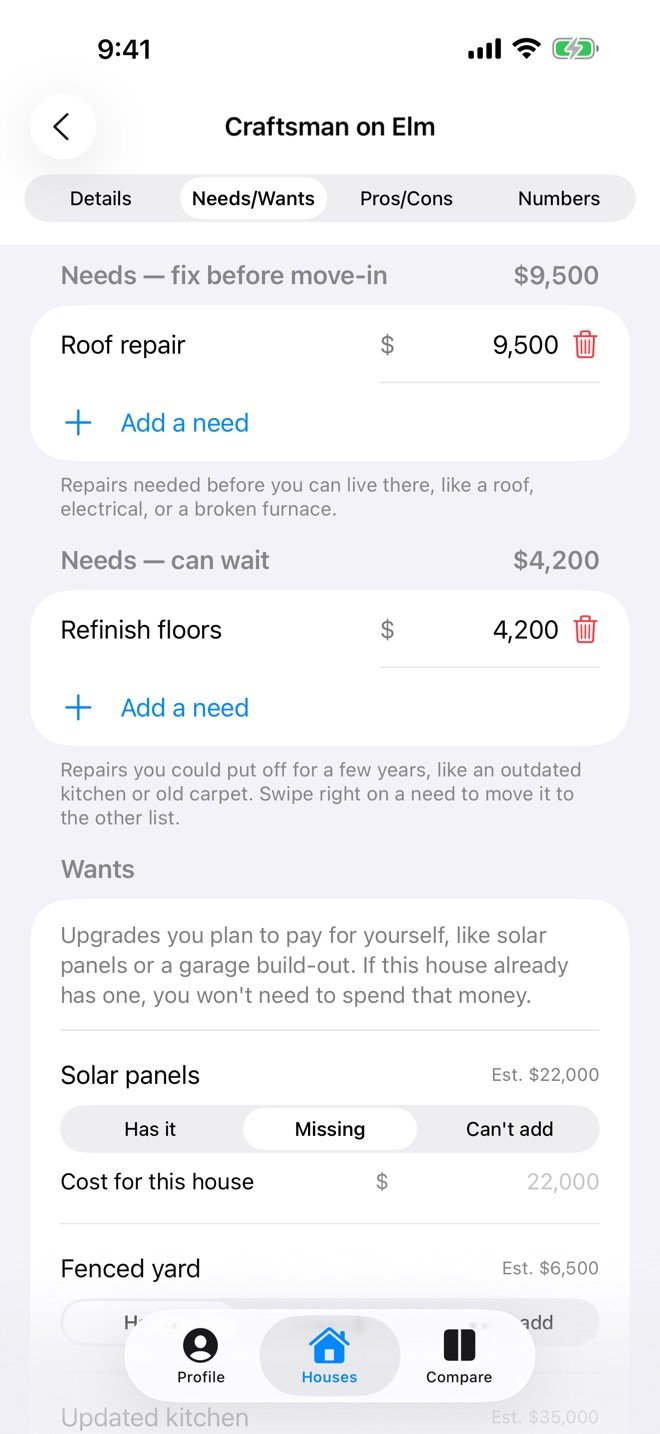
Next is the needs and wants tab. For the first house, I list the repairs it needs. A new roof and a new heating and air conditioning system have to be fixed before I move in. A new kitchen, two bathrooms, and a new flooring can wait. That adds up to $150,000. These costs don't show up in the listing price and they're what makes the cheaper house more expensive.
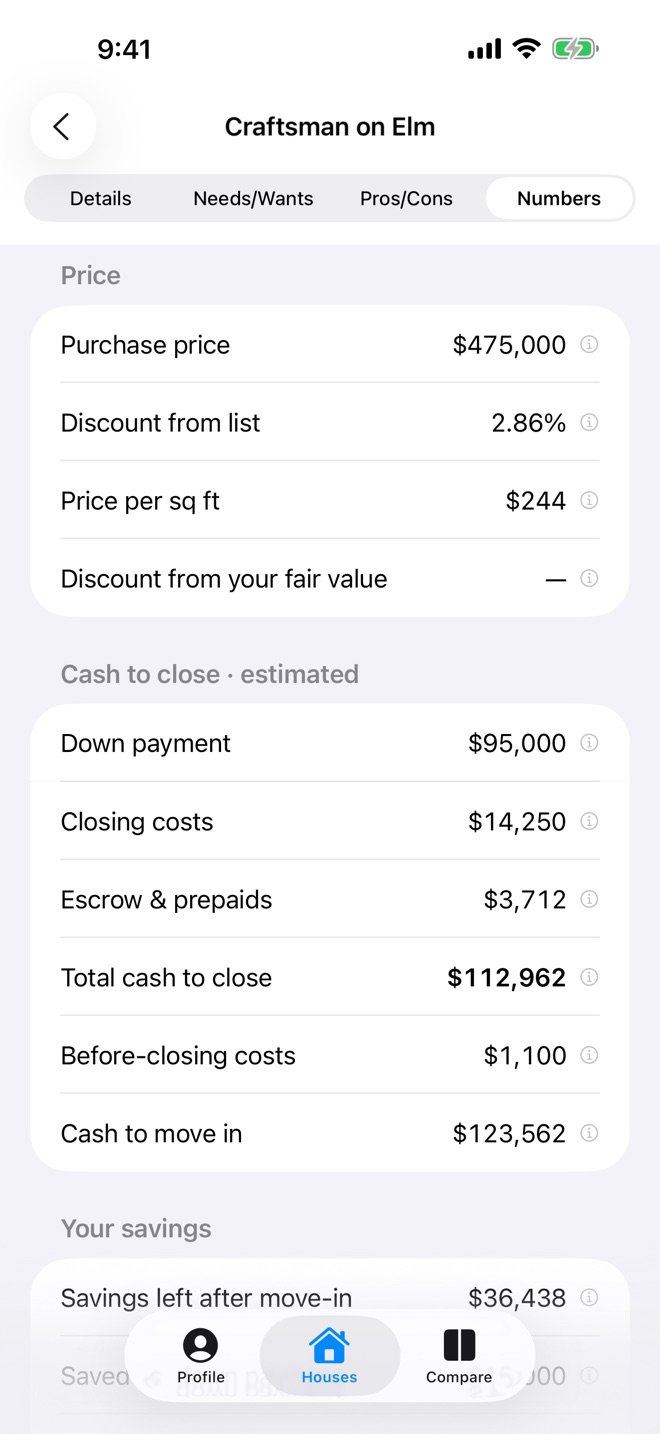
Here's the cash to move in, the down payment, closing costs and escrow, plus the repairs that have to be done before move in. This is the money needed on day one and it can be very different from house to house.
[On screen: Needs total $150,000: fix before move-in $45,000, can wait $105,000. Cash to move in: $228,188 for the house that needs work, $206,438 for the renovated house.]
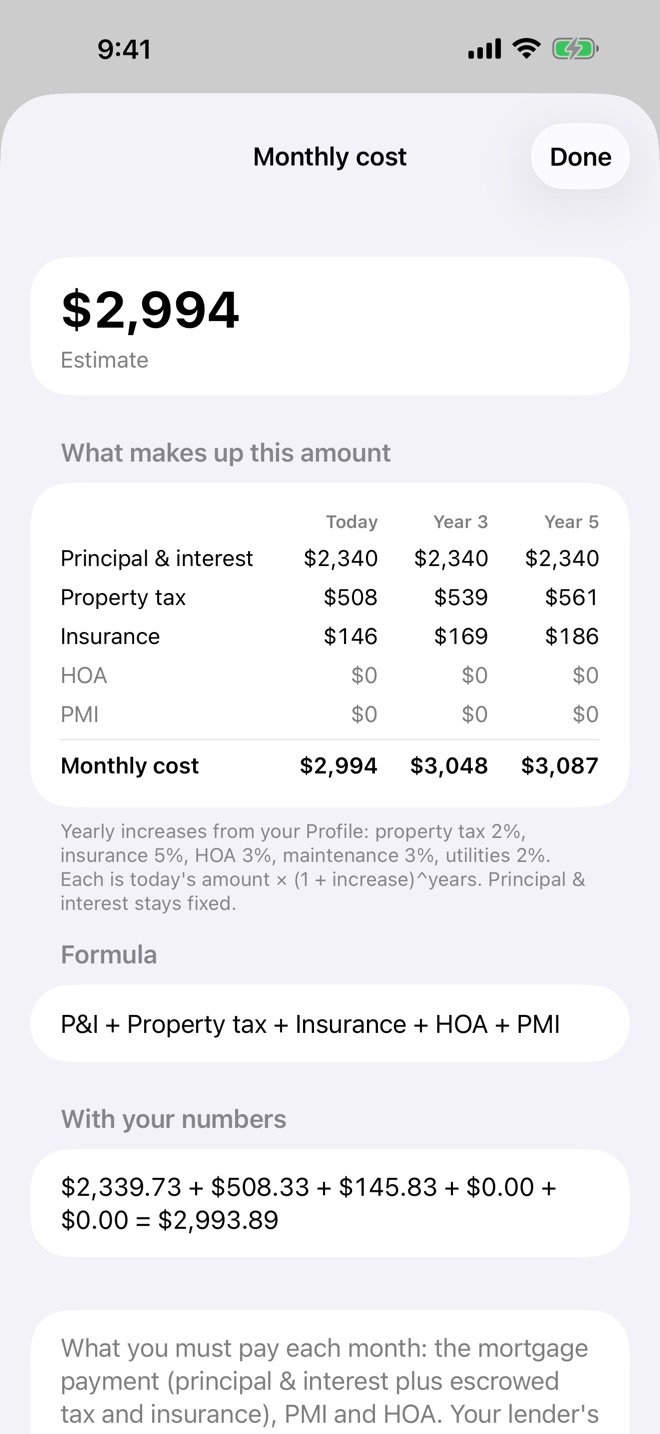
This is the monthly cost, the mortgage payment, property tax, insurance, HOA, and PMI if the down payment is under 20%. It shows today, in 3 years, and in 5 years. And here's something interesting. The first house costs about $590 less per month. If I want to know where a number comes from, I just tap any blue number. And the app shows what makes up the amount, the formula, and my numbers. Nothing is hidden. I'm an accountant. So that part is very important to me.
[On screen: Monthly cost today: $4,765 versus $5,354, about $589 less per month for the first house.]
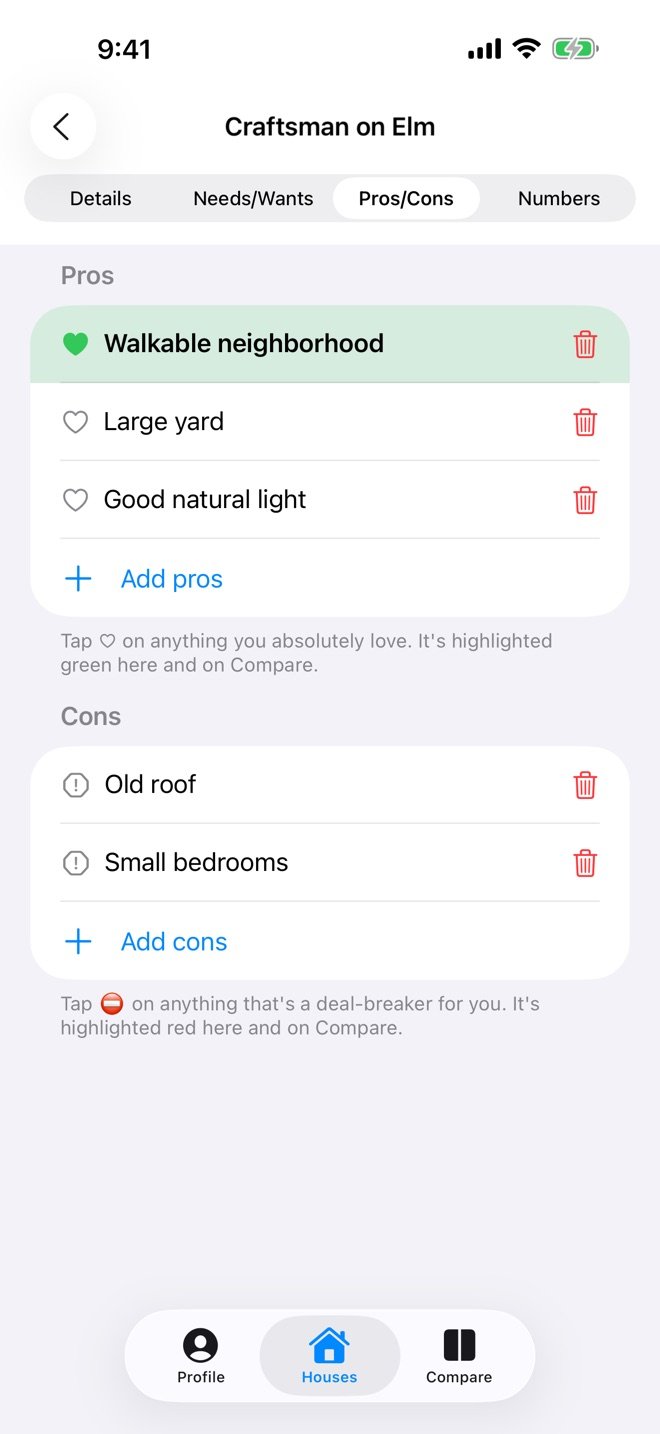
Now, the part that isn't just numbers, on the pros and cons tab, I list what I like and don't like about each house. A heart marks a must have and a red mark is a deal breaker. Wants are things like a big yard or a home office and for each house I mark whether it has it. Maybe the renovated house has a bigger yard or a shorter drive to work. This is where the trade-off shows up side by side.
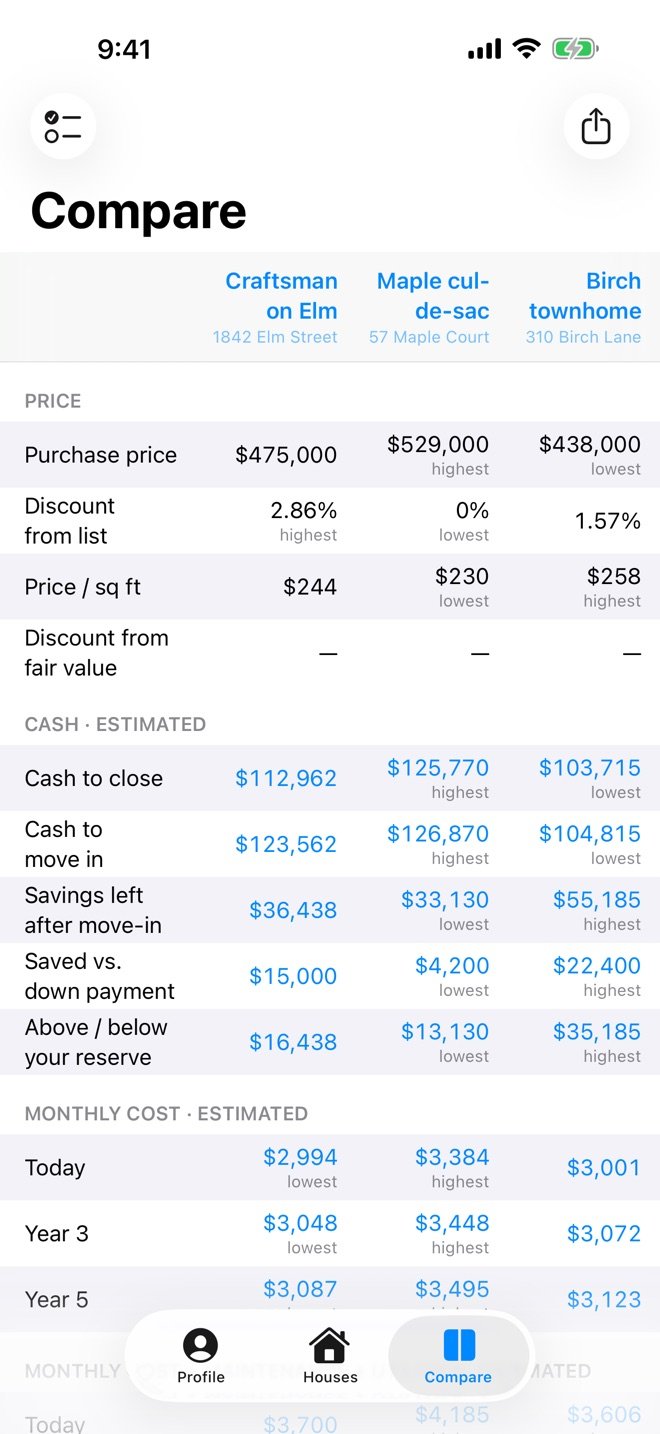
And here's the comparison. Up to 3 houses side by side. The all-in cost adds up the price, the closing cost, escrows, and the repairs. The first house comes to about $953,000. The renovated house is about $906,000. So the cheaper house comes to about $47,000 more, even though its monthly cost is lower.
[On screen: All-in cost $953,188 versus $906,438. All-in difference: plus $46,750 for the house with the lower list price. Monthly cost today: $4,765 versus $5,354.]
I can also tap share report to make a PDF report of the whole comparison and share with my partner, my family or my real estate agent.
Home Comparison Calculator is free to try, it's on the App Store for iPhone and iPad, and on Google Play for Android phones. The links are in the description. Thank you for watching and good luck with your home search.
[On screen: Free to try, with the App Store and Google Play badges.]
App screens show sample data.
How it works
Set up your loan once
Down payment, interest rate and loan term, your savings, and yearly cost increases go in your profile, so every house is measured the same way.
Add each house
Price, property tax, insurance, HOA, repairs, which of your wanted upgrades it has, and pros and cons.
Compare and share
See up to three houses side by side, tap any number for its formula, and share a PDF report.
What Home Comparison Calculator works out for each house
Enter a house’s price, taxes, insurance and HOA once, set up your loan in your profile, and the app does the math.
Cash to move in
- Down payment, closing costs and escrow
- Inspections and other costs before closing
- Repairs that must be done before move-in
Monthly cost
- Principal and interest, property tax, insurance, HOA and PMI
- With maintenance and utilities added in
- Projected for year 3 and year 5, using your own yearly increases
All-in cost
- Price plus every cost to buy, including repairs that can wait
- Upgrades you want, like solar or a fenced yard, and which houses already have them
See how every number is calculated
Tap a number to see the formula, your numbers plugged in, and what makes up the total. The monthly cost shows today, year 3 and year 5 side by side.
More than the math
Pros and cons
For each house, with the ones you love or can’t live with highlighted here and on Compare.
Needs and wants
Repairs before move-in, repairs that can wait, and the upgrades you plan to pay for.
Savings check
Each house against your savings and the emergency reserve you set.
PDF report
A clean side-by-side comparison to share with a partner or agent.
Share a PDF comparison report
Turn up to three houses into one clean report to share with a partner or agent, through your device’s own share options (email, messages, files and more).
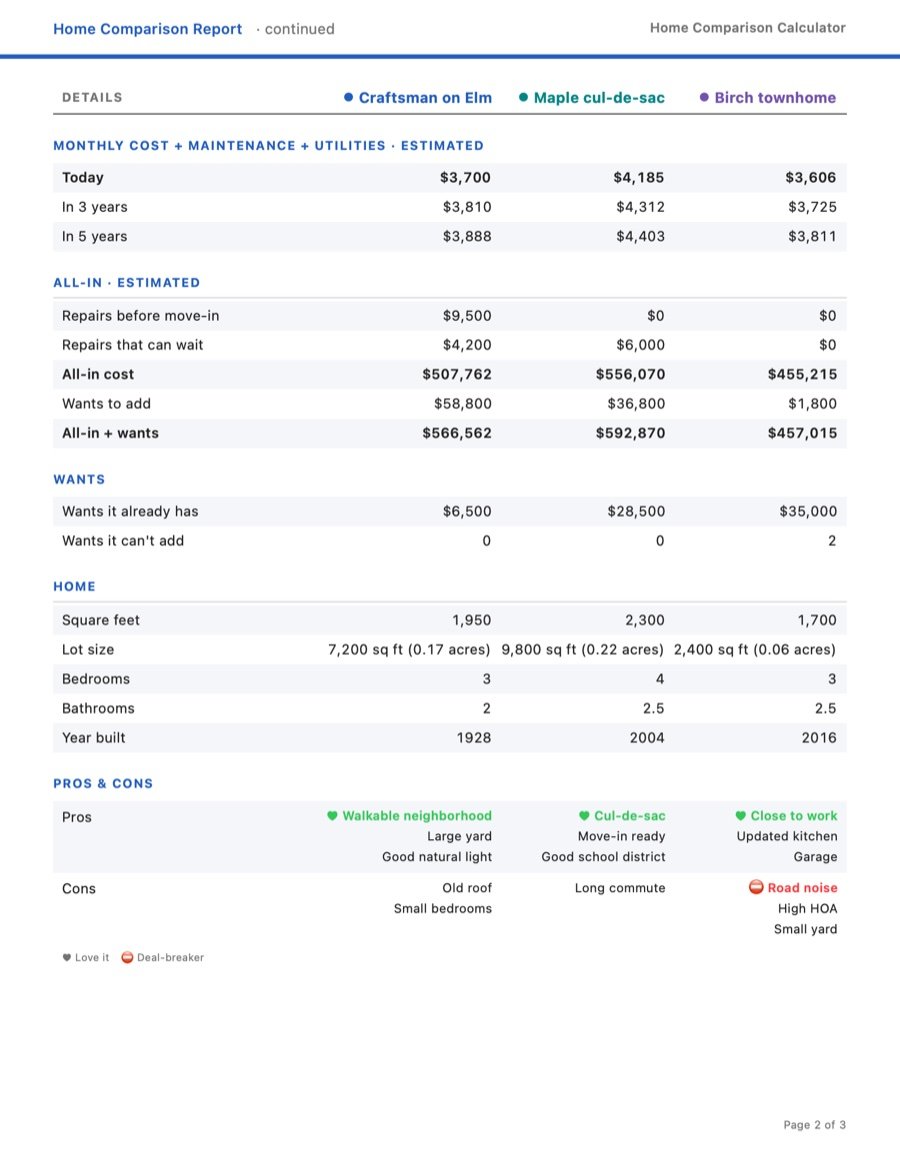
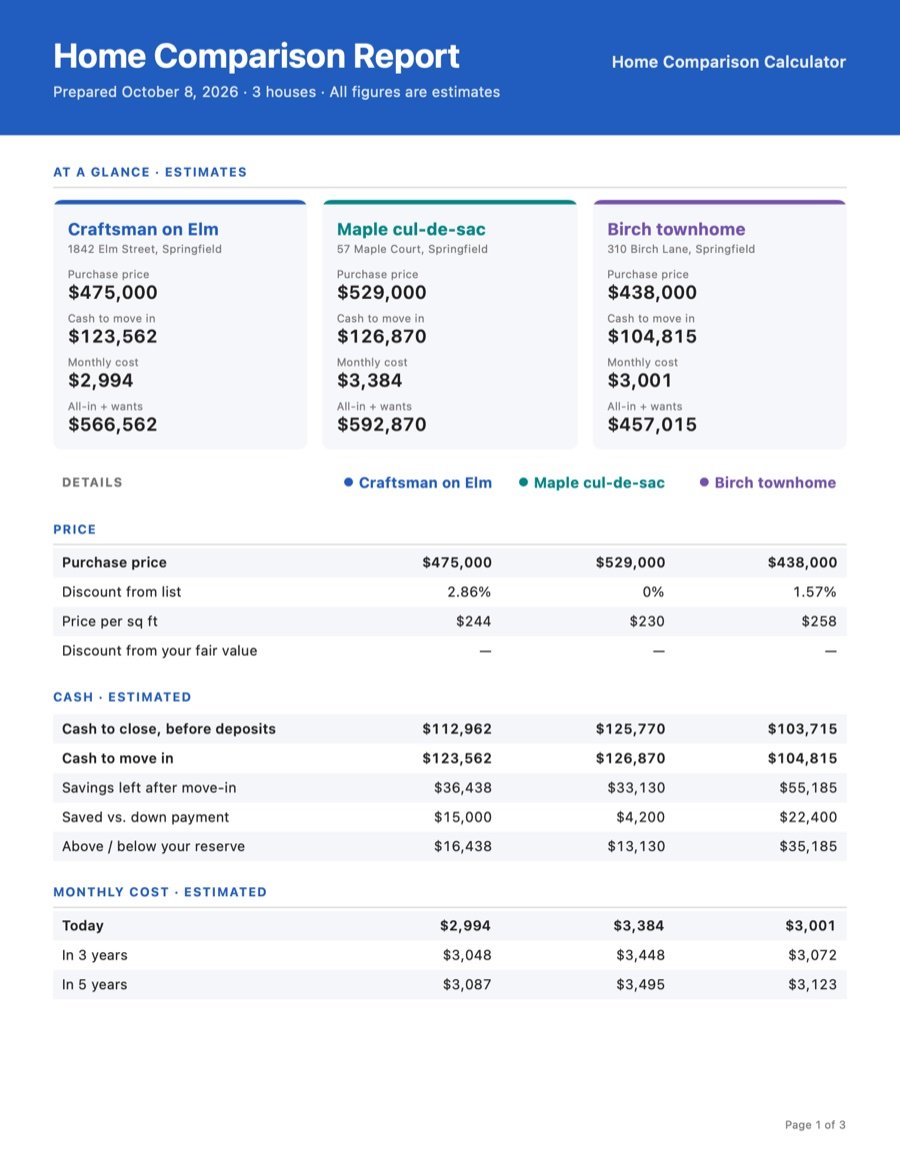
- “At a glance” cards: price, cash to move in, monthly cost and all-in cost for each house
- Price, cash, monthly cost today and in 3 and 5 years, side by side
- All-in cost, repairs, wants, home facts, pros and cons, and your notes
- US Letter pages, ready to print
Included with the $4.99 unlock. See the full sample report (PDF, 3 pages)
Free to try, one price to unlock
| Feature | Free | Full version ($4.99, one time) |
|---|---|---|
| Houses | 2 | Unlimited |
| Each house’s full numbers | Yes | Yes |
| Side-by-side Compare | Price and cash to close | Every row |
| PDF comparison report | No | Yes |
No subscription. The purchase is made through the App Store.
Your data is stored on your device
No account, no sign-in, no ads and no tracking. The houses and numbers you enter are stored on your device and are never sent to EverReachCraft. On iPhone and iPad, addresses you type are sent to Apple Maps for address suggestions; on Android there are no address suggestions. Details are in the Home Comparison Calculator privacy policy.
Home Comparison Calculator: common questions
Is it free?
It’s free to try with up to two houses, including each house’s full numbers. A one-time $4.99 purchase unlocks unlimited houses, the full side-by-side comparison and the PDF report. There’s no subscription.
Which devices does it work on?
iPhone and iPad, from the App Store, and Android phones (Android 8.0 or later), from Google Play. Same features and the same $4.99 unlock on both.
Do I need an account?
No. There’s no account and no sign-in. What you enter is stored on your device and is never sent to EverReachCraft. On iPhone and iPad, addresses you type are sent to Apple Maps for suggestions; on Android there are no address suggestions. Device backups and reports you choose to share are covered in the app’s privacy policy.
Does it tell me which house to buy?
No. It’s a calculator: it shows math based only on the numbers you enter, and doesn’t tell you what to buy or what you can afford. It isn’t financial, tax, legal or real estate advice.
Questions or problems: the Contact page. More house-buying math on the blog: Rent vs. Buy in 2026 and How Much Income Do You Need for a $1 Million Home? Other apps: Apps by EverReachCraft.
Disclaimer
Home Comparison Calculator is a calculator. It shows estimates based only on the numbers you enter. The app doesn’t tell you what to buy or what you can afford, and it isn’t financial, tax, legal or real estate advice. Although it is designed by a licensed CPA, using it does not create a CPA-client or other professional-client relationship. A lender, real estate agent, tax professional or attorney can confirm the numbers and terms for a specific home. See the Terms of Service for additional terms and limitations.