





Web Apps
Truck Maintenance Tracker
$149.99
Service schedules, repairs, readings and costs for trucks, trailers and equipment. No yearly fee.
About this app
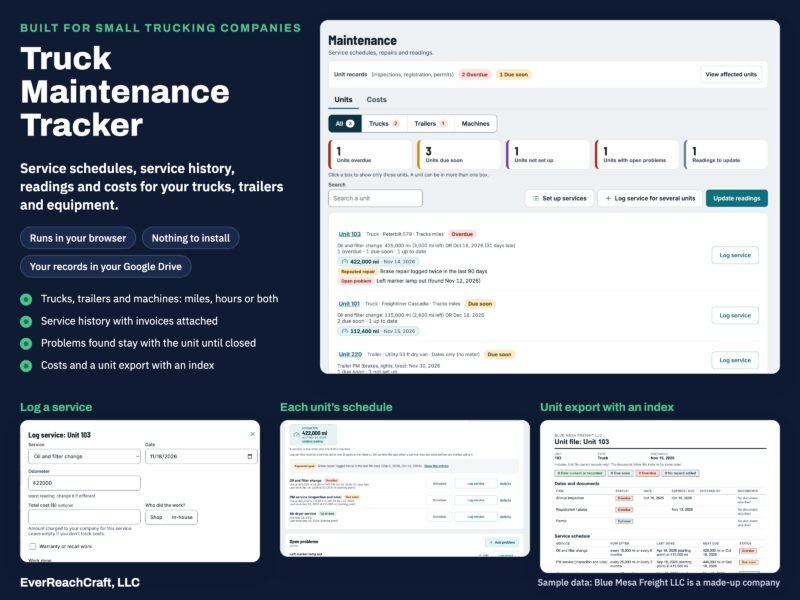
The Truck Maintenance Tracker from EverReachCraft, LLC is a web app that keeps service schedules, service history, readings, costs and problems found for any number of trucks, trailers and equipment, along with unit dates such as annual inspection, registration and permits. It runs in your web browser and signs in with your Google account, so there is nothing to install. Your records and documents stay in your own Google Drive. It can be used on its own, or together with the Trucking Compliance Tracker in the same app.
At a glance
- 1 user, plus up to 10 extra users ($49 each)
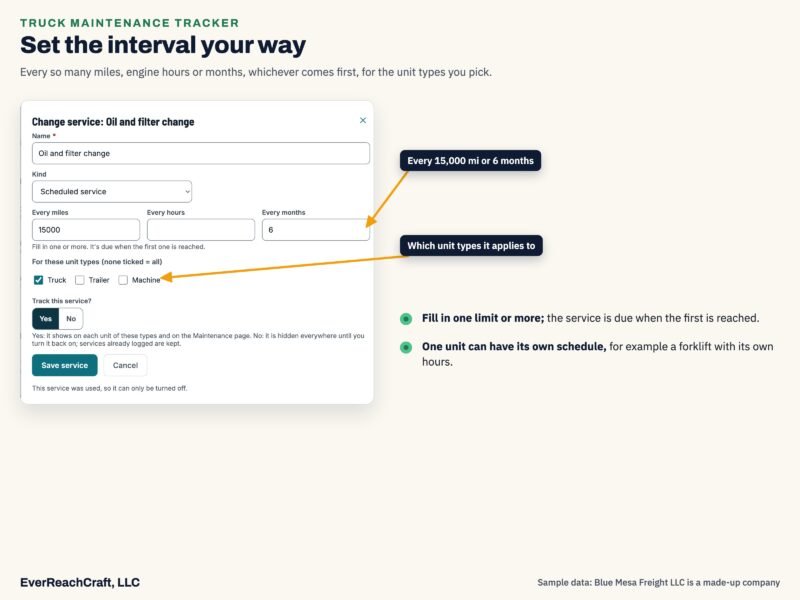
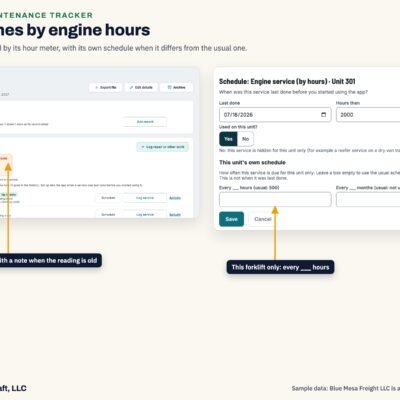
- Service schedules by miles, engine hours or months
- Service history and costs, with invoices or photos attached
- Unit dates: annual inspection, registration and plates, permits
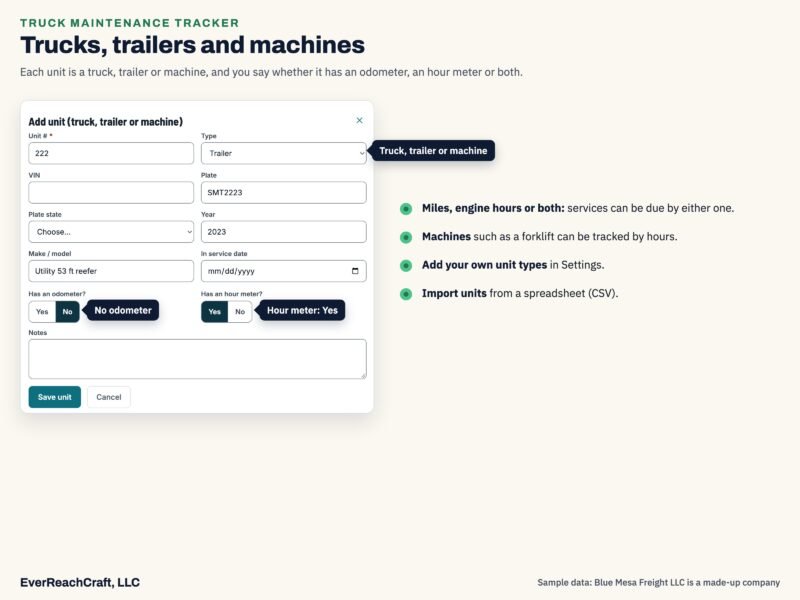
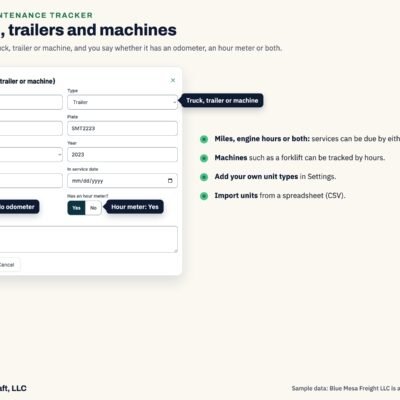
- Any number of trucks, trailers and equipment
- Add the Trucking Compliance Tracker later for the difference
What it keeps track of
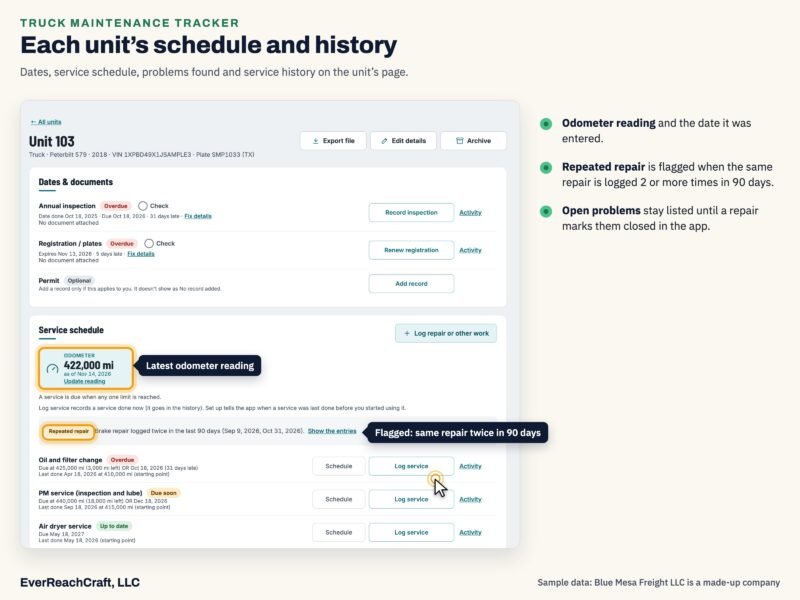
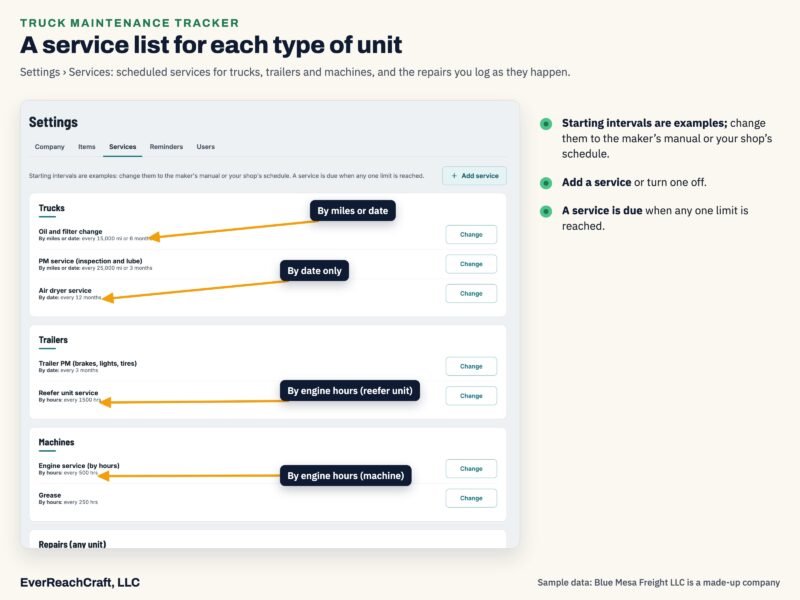
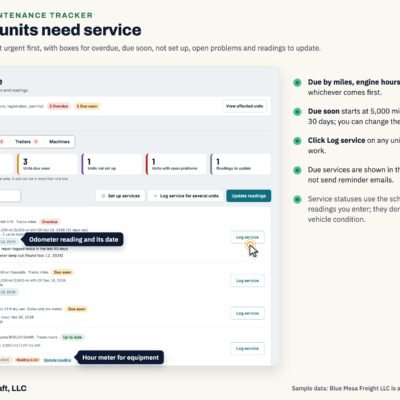
- Service schedules by miles, engine hours or months, whichever comes first. The starting service list can be edited, and services added or removed (Set up services).
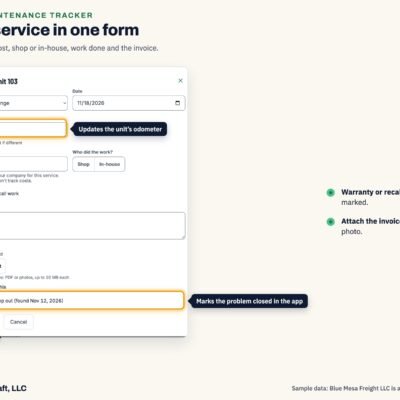
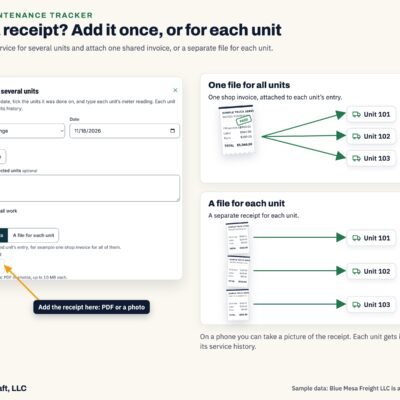
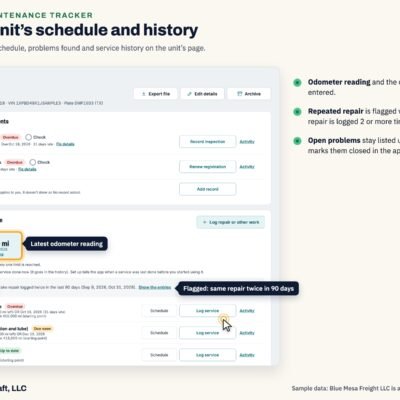
- Service log: each service with the date, reading, work done, total cost, who did it (shop name or in-house), warranty or recall, and attached invoices or photos. Log service for several units at once with one shared invoice.
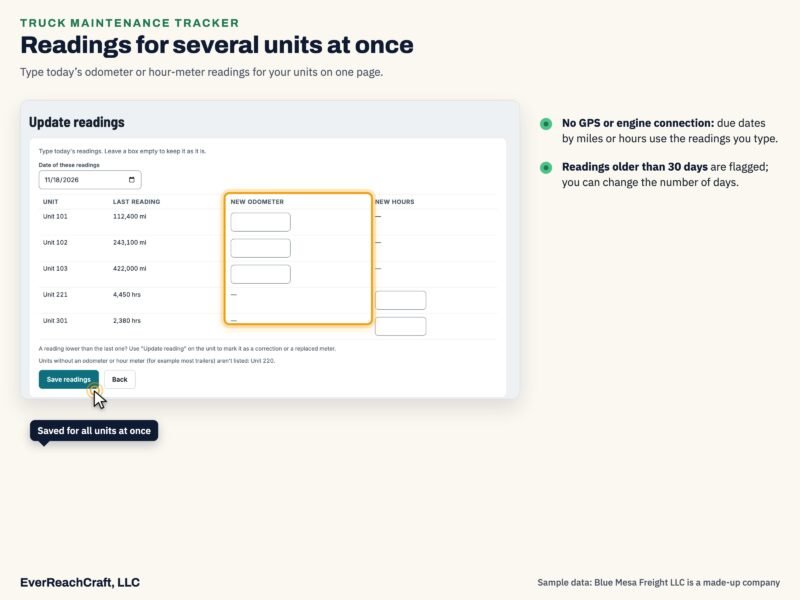
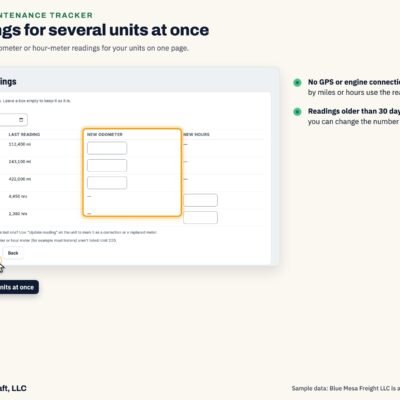
- Readings: the app has no GPS or engine connection, so due dates by miles or hours use the readings you type. Update readings for several units at once. Readings older than 30 days are flagged (you can change the number of days).
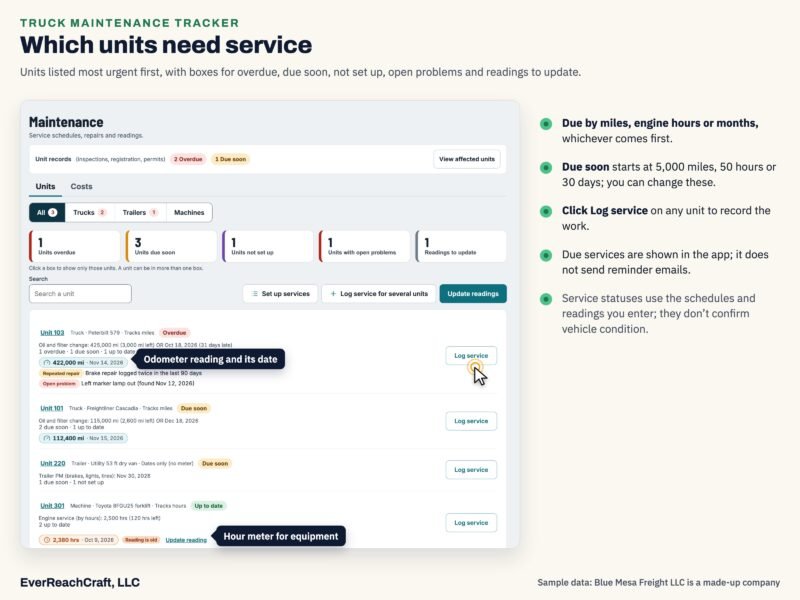
- Service statuses: Overdue, Due now, Due soon, Up to date or Not set up. Due soon starts at 5,000 miles, 50 hours or 30 days (you can change these).
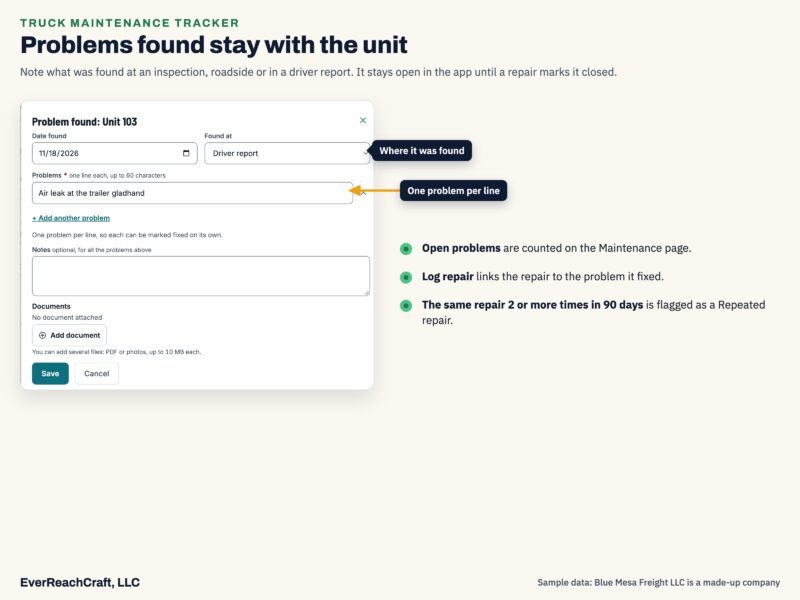
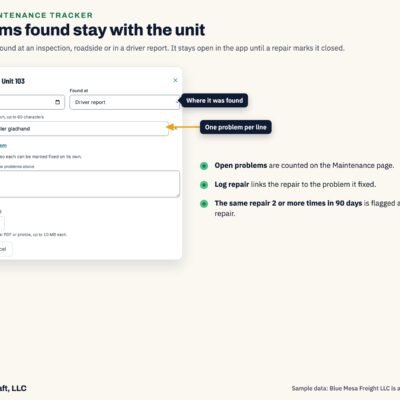
- Problems found: open problems stay with each unit until they are fixed; repairs are linked to the problems they fixed, and the same repair 2 or more times in 90 days is flagged as a Repeated repair.
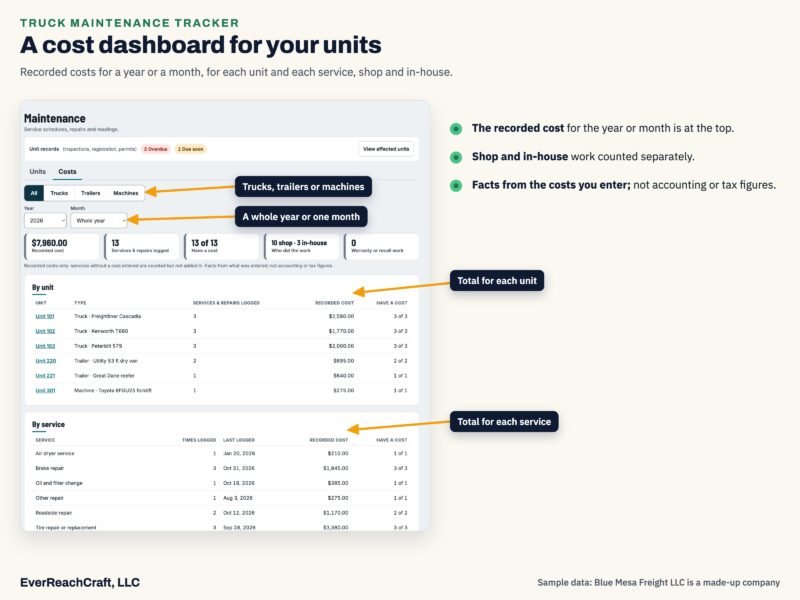
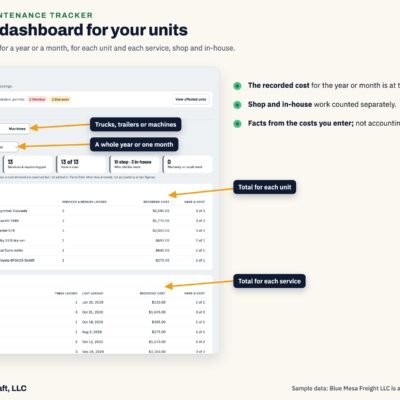
- Costs: totals by year or month, shop and in-house.
- Activity for each service: who added or changed it, and when.
- Unit records: annual inspection, registration and plates, permits and your own unit items, with documents. Statuses: Overdue, Due now, Due soon or No record added.
- Import from a spreadsheet (admins): units from a CSV file, up to 500 rows per file.
The Maintenance screen
- Boxes for units overdue, due soon, not set up, with open problems, and readings to update; units listed most urgent first.
- A Unit records line with colored counts (Overdue, Due now, Due soon, No record added) and View affected units.
- A Costs tab: totals by year or month, shop and in-house.
- The app does not send reminder emails; due services are shown in the app.
Documents and exports
- Invoices and documents: attach PDFs or photos (on a phone you can take a picture).
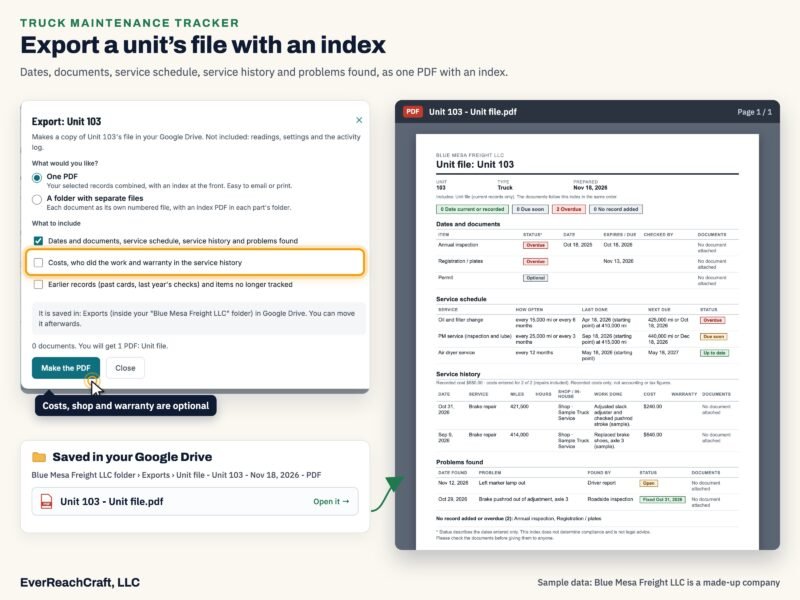
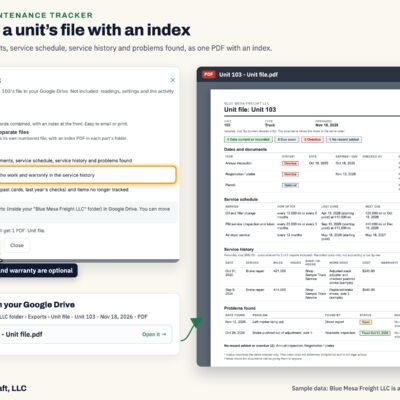
- Export file: a unit’s dates and documents, service schedule, service history and problems found (costs optional), as one PDF with an index, or a folder of numbered files with an index PDF in each part, saved in your Google Drive.
Users and roles
- Includes 1 user (the license holder), who is an admin.
- Admin: everything, including Settings and users. Staff: day-to-day work, but in the app can’t open Settings or delete permanently; these app limits don’t change what a user can open in the shared company folder in Google Drive.
- Extra users: $49 each, up to 10 per license (11 people in total). Each user signs in with their own Google account.
Which version is which
| Feature | Owner-Operator (Solo) | Company | Truck Maintenance Tracker (this page) |
|---|---|---|---|
| Price | $49.99 | $799.99, or $40 a month for 24 months | $149.99 |
| Users | 1, plus 1 extra user (a partner, $49); both admins | 1, plus up to 10 extra users ($49 each); Admin or Staff | 1, plus up to 10 extra users ($49 each); Admin or Staff |
| Drivers | 1 (you) | Any number, with hiring items | None (maintenance only) |
| Trucks, trailers, equipment | Up to 3 in service (no limit with the Maintenance Tracker) | Any number | Any number |
| Driver files and company items | Yes | Yes | No |
| Unit dates (inspection, registration, permits) | Yes | Yes | Yes |
| Service schedules, history and costs | With the Maintenance Tracker (+$100) | With the Maintenance Tracker (+$100; $899.99 together) | Yes |
| Rules Update Plan (optional, yearly) | $25 a year | $79 a year | Not offered |
How it works
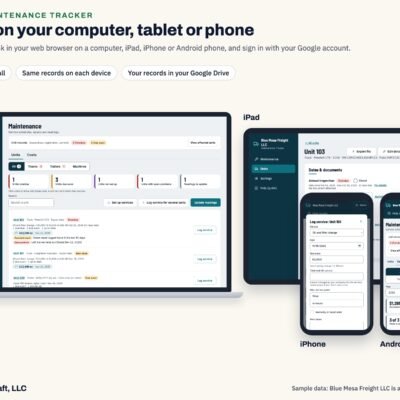
- It runs in a web browser on a computer, tablet or phone and signs in with your Google account, so there is nothing to install. You can add a shortcut to your home screen with your browser’s Add to Home Screen or Install command.
- What you need: a Google account (Gmail is not required). A Gmail address works, and so does a business Google Workspace account; a Workspace admin may need to allow the app, or sharing outside the company. Another email address (for example Outlook or Yahoo) can be made into a free Google account at accounts.google.com: choose Create account, then “Use your existing email”. Each person signs in with the exact email their license or invite was given to. A Google account made from another email has no Gmail, so the app does not send user invites from it; it shows a message you can copy and send from your usual email instead.
- Your records and documents are kept in your own Google Drive. Each user you add gets access to the company folder (the data file and documents) so the app works for them; anyone who opens the data file there can see and change it.
- Your files: the app reads the data file, folders and documents in your Google Drive each time it opens. Deleting, moving or renaming them in Google Drive can remove records from the app, and a deleted data file means the records in it are gone. EverReachCraft has no access to your Google Drive unless you share files with us (for example, for support), and we are not able to recover files you delete. A file in the Google Drive trash can be restored from the trash (Google keeps it for about 30 days). Backing up your files is your company’s responsibility, for example with a regular Export or a copy of the data file.
- As your records add up: the app reads your data file each time it opens, so opening takes longer as records add up over the years; once it is open, moving between screens is usually quick. Estimated opening times, based on a November 2026 EverReachCraft test on Google with made-up companies (Compliance Tracker + Maintenance Tracker; most of the growth comes from maintenance history such as odometer readings and service records): about 3 seconds for Solo and about 4–5 seconds for a company with about 40 drivers and 40 trucks after 5 years, and about 3–4 and 9–10 seconds after 20 years. The large-company times after 5 and 20 years were timed in the test; the others are worked out from it. Times depend on how much your company enters, your internet connection and Google’s speed on the day. The getting-started guide has the full table. If opening gets slower than you’d like, ask EverReachCraft about options.
- To run your license, EverReachCraft keeps a short license list (company name, your users’ emails, names and roles, what you bought, order records, and which files and folders are your company’s, so the app can find them), as described in the privacy policy.
- Your license is set up after payment, and the app link and sign-in steps are emailed to the Google account email you enter at checkout.
- Until Google finishes verifying the app, Google shows a warning page the first time you allow access; the getting-started guide shows the steps.
What’s included
- 1 user (the license holder)
- Reasonable efforts to correct bugs at no charge while we offer the app, as described in the Terms of Service (Section 7.7)
- Answers to basic questions about using the app (for example, where a setting is or how to add a unit) by email for 14 days after your license is set up
- A getting-started guide
Paid help: training sessions, setting up or entering your data, correcting data entered by mistake, customizations, custom setups, and basic questions after the first 14 days are paid at our current rates on everreachcraft.com. New features are not included or promised; some may be offered as paid add-ons.
Add-ons and upgrade
- Extra user: $49 per user, one-time. Up to 10 extra users per license (11 people in total); for more, contact us about a custom setup.
- Add the Trucking Compliance Tracker (Company): $750 one-time (the difference to Company + Maintenance Tracker). All records are kept. Buy it with the license holder’s Google account email.
Add-ons and upgrades are attached to your license, end when the license ends, and are non-refundable once added to your license, except as stated in the Terms of Service.
The Truck Maintenance Tracker has no Rules Update Plan.
See the Terms of Service (Section 7.7) and the Trucking Compliance Tracker Privacy Policy.
Reviews
There are no reviews yet.