

App · For home buyers
Home Comparison Calculator
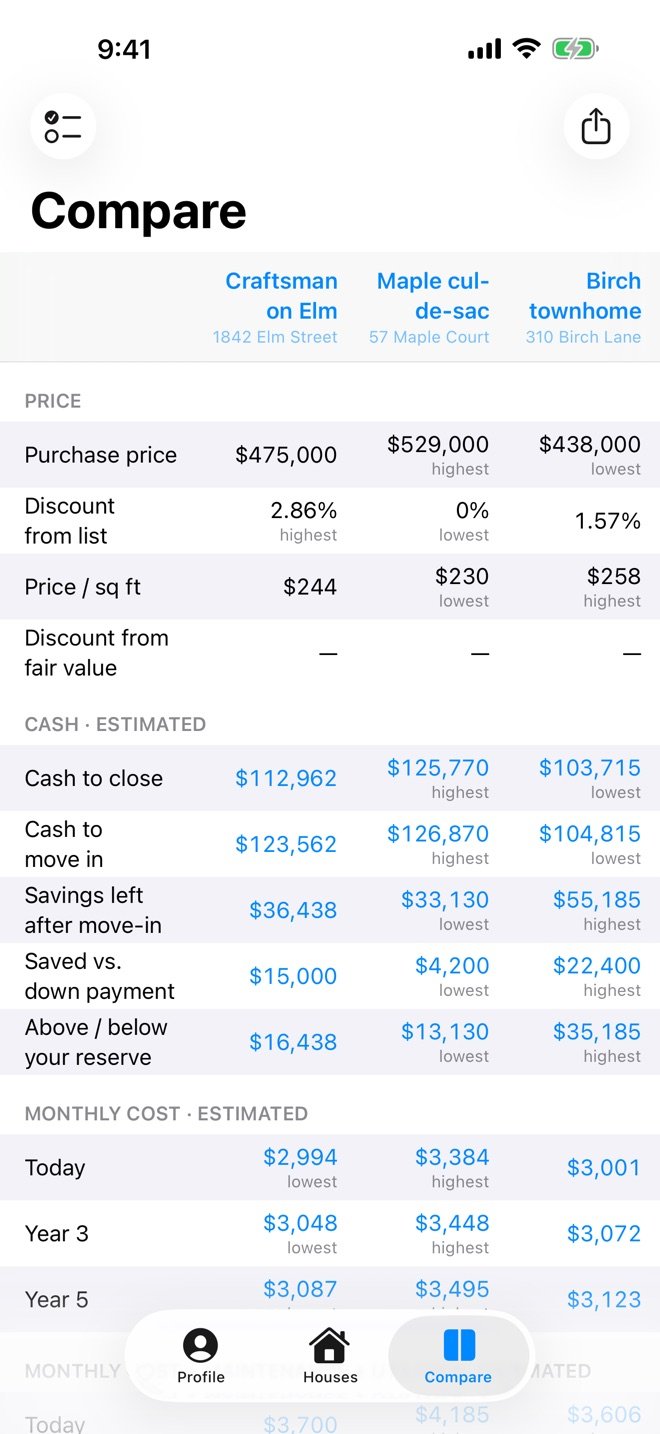
Home Comparison Calculator compares up to three houses side by side on your iPhone or iPad: the cash to move in, the monthly cost today and in 5 years, and the all-in cost of each one.

Coming soon to Android
Free to try · $4.99 one-time unlock · No subscription · No account
A lower price doesn’t always mean a lower cost
Houses are usually compared by price. But a house that needs work costs its price plus the work. Take a house listed at $775,000 that needs $150,000 of renovation, some right away and some over the next few years, and a fully renovated house listed at $875,000:
Needs work
Price $775,000
Renovation, now and later + $150,000
Real cost $925,000
Already renovated
Price $875,000
Renovation $0
Real cost $875,000
The house that looks $100,000 cheaper costs $50,000 more.
Repairs, counted in
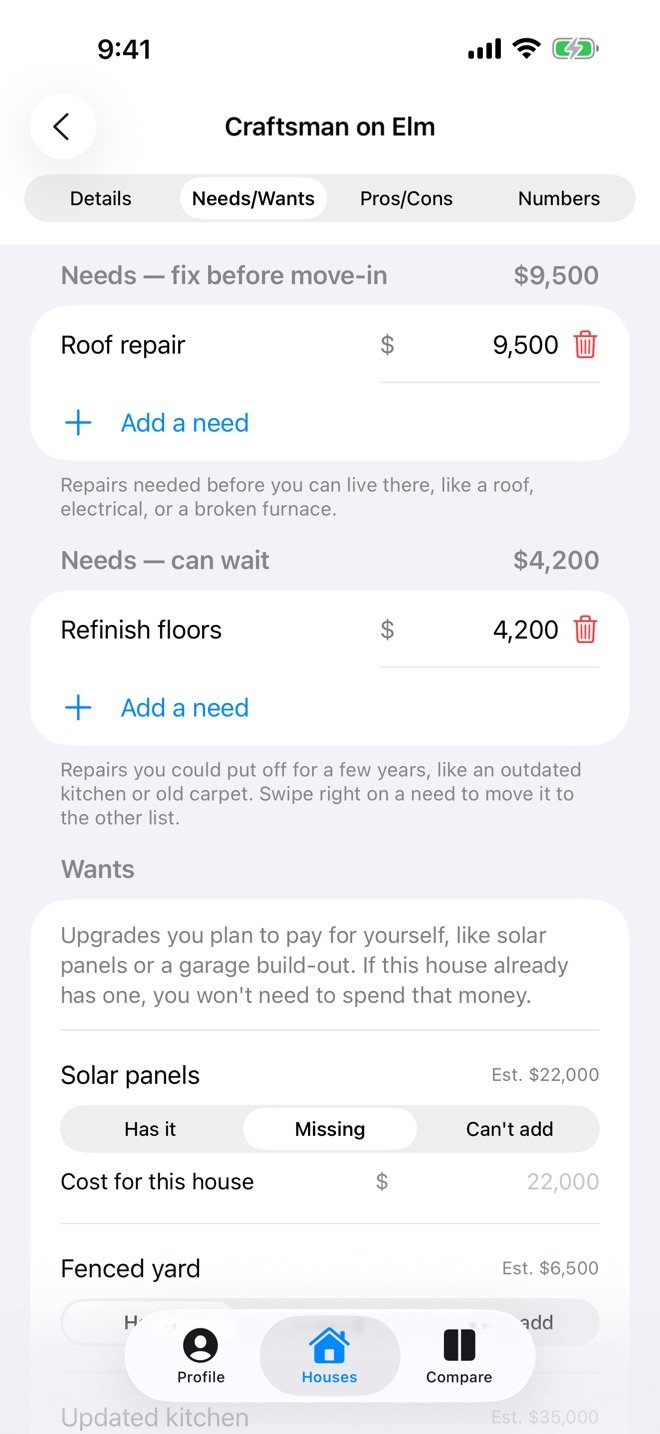
Repairs are easy to set aside during a showing, when attention goes to the layout, the light and the neighborhood. The app keeps two repair lists for each house, “fix before move-in” and “can wait”, and adds them into the cash to move in and the all-in cost.
What a renovation can’t add
Some things can’t be added at any price: the location, the school district, the lot or the view. When one house has something the other can’t match, the app shows exactly how much more it costs to get it.
Worked example with three sample houses: How to Compare Houses Side by Side.
See it in 38 seconds
The $775,000 house that needs $150,000 of work, next to the $875,000 renovated one, and how Home Comparison Calculator lays out the real cost of each house.
What the video shows
- “Does the cheaper house really cost less?” A house that needs work, listed at $775,000, and a renovated house, listed at $875,000.
- $150,000 of repairs is added to the first house, and its cost becomes $925,000: the cheaper one costs $50,000 more.
- “See what each house really costs”: Home Comparison Calculator adds up price, repairs, closing costs and monthly costs, side by side.
- The app, with sample houses: adding a house, comparing three houses, repairs and upgrades, monthly cost today and in years 3 and 5, the formula behind a number, must-haves and deal-breakers, and the PDF report.
- “Buying a home is emotional. The math doesn’t have to be.” Free to try on iPhone and iPad, on the App Store; coming soon to Google Play.
The video has music and no speech. App screens show sample data.
How it works
Set up your loan once
Down payment, interest rate and loan term, your savings, and yearly cost increases go in your profile, so every house is measured the same way.
Add each house
Price, property tax, insurance, HOA, repairs, which of your wanted upgrades it has, and pros and cons.
Compare and share
See up to three houses side by side, tap any number for its formula, and share a PDF report.
What Home Comparison Calculator works out for each house
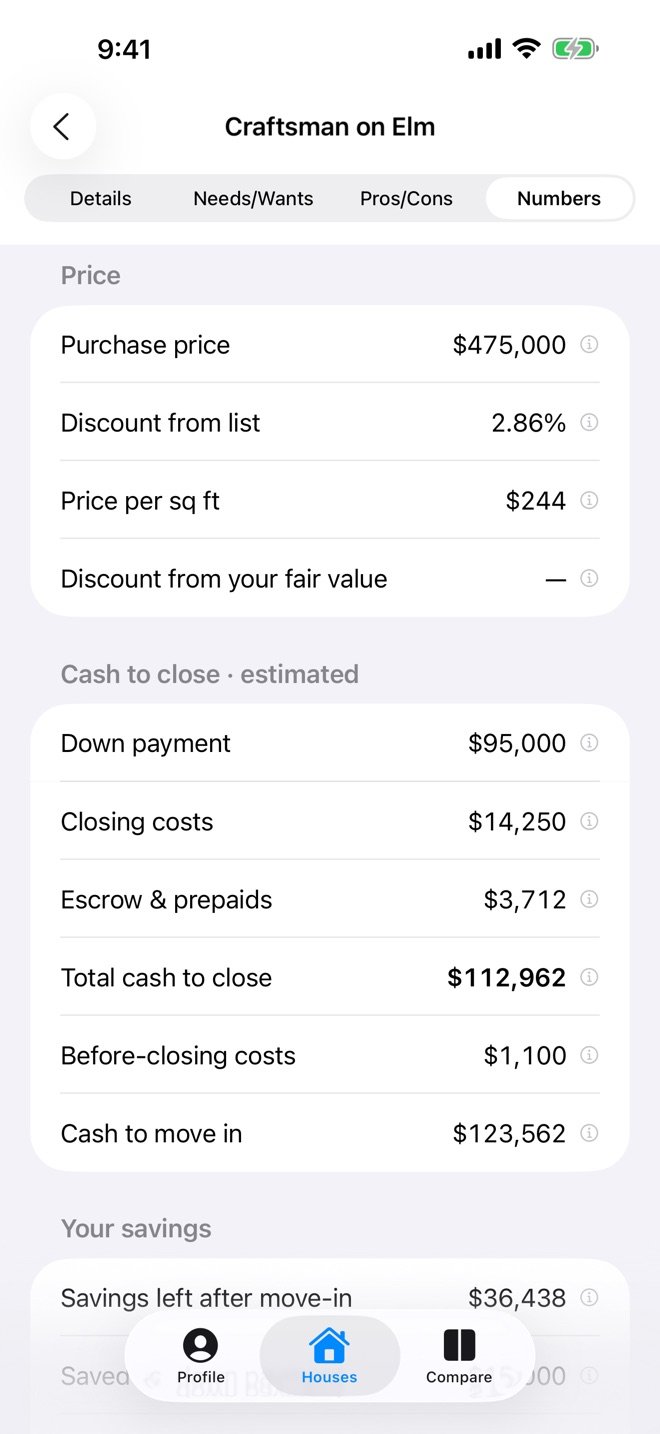
Enter a house’s price, taxes, insurance and HOA once, set up your loan in your profile, and the app does the math.
Cash to move in
- Down payment, closing costs and escrow
- Inspections and other costs before closing
- Repairs that must be done before move-in
Monthly cost
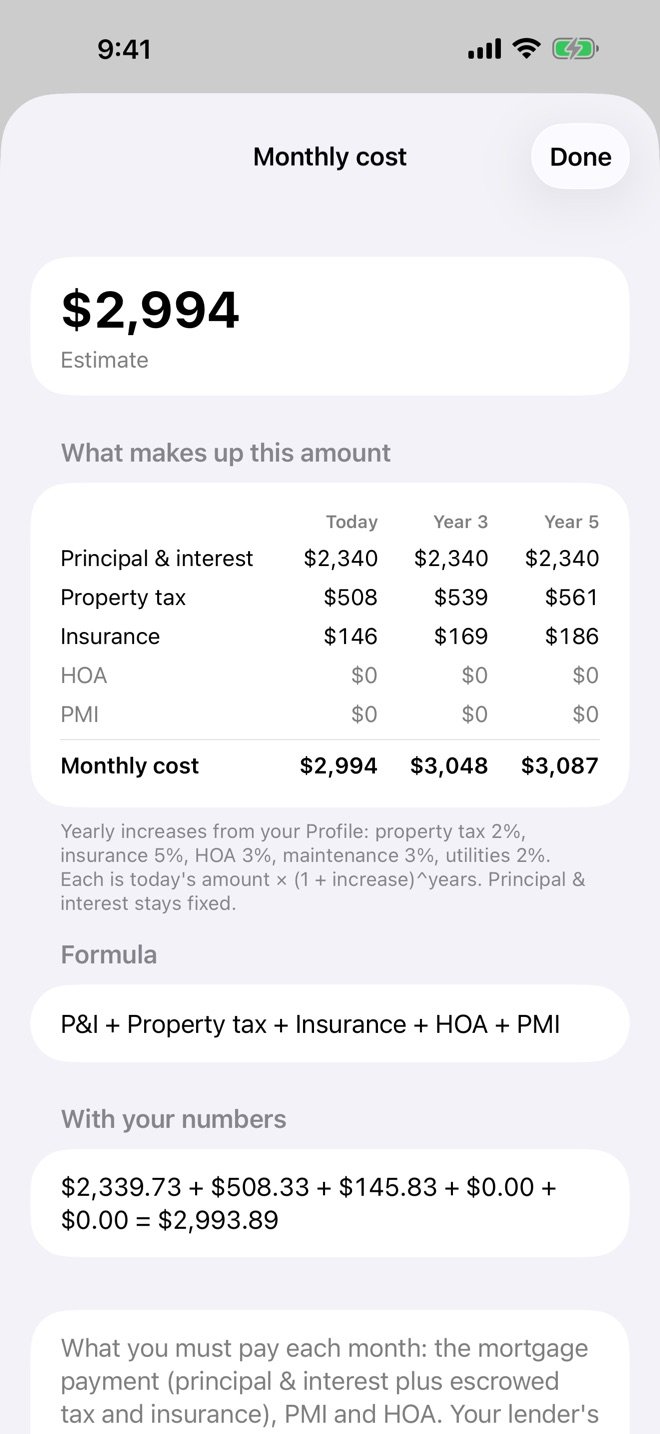
- Principal and interest, property tax, insurance, HOA and PMI
- With maintenance and utilities added in
- Projected for year 3 and year 5, using your own yearly increases
All-in cost
- Price plus every cost to buy, including repairs that can wait
- Upgrades you want, like solar or a fenced yard, and which houses already have them
See how every number is calculated
Tap a number to see the formula, your numbers plugged in, and what makes up the total. The monthly cost shows today, year 3 and year 5 side by side.
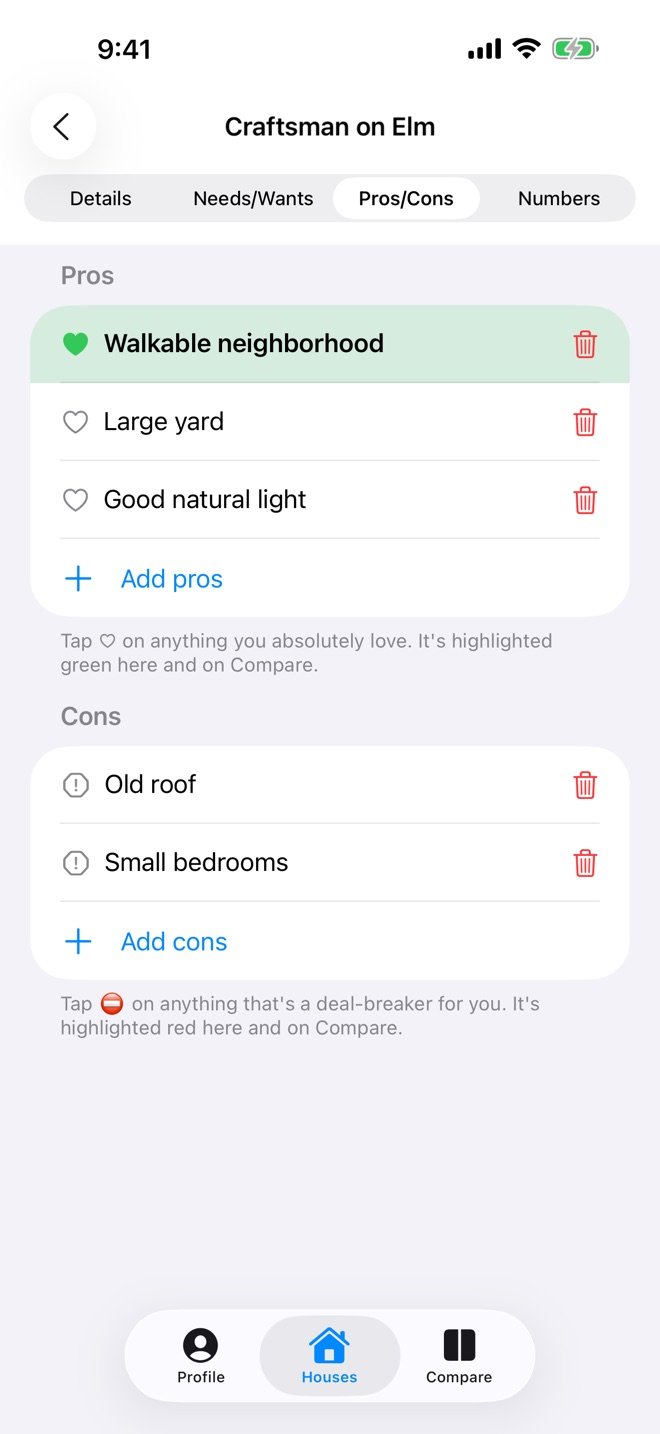
More than the math
Pros and cons
For each house, with the ones you love or can’t live with highlighted here and on Compare.
Needs and wants
Repairs before move-in, repairs that can wait, and the upgrades you plan to pay for.
Savings check
Each house against your savings and the emergency reserve you set.
PDF report
A clean side-by-side comparison to share with a partner or agent.
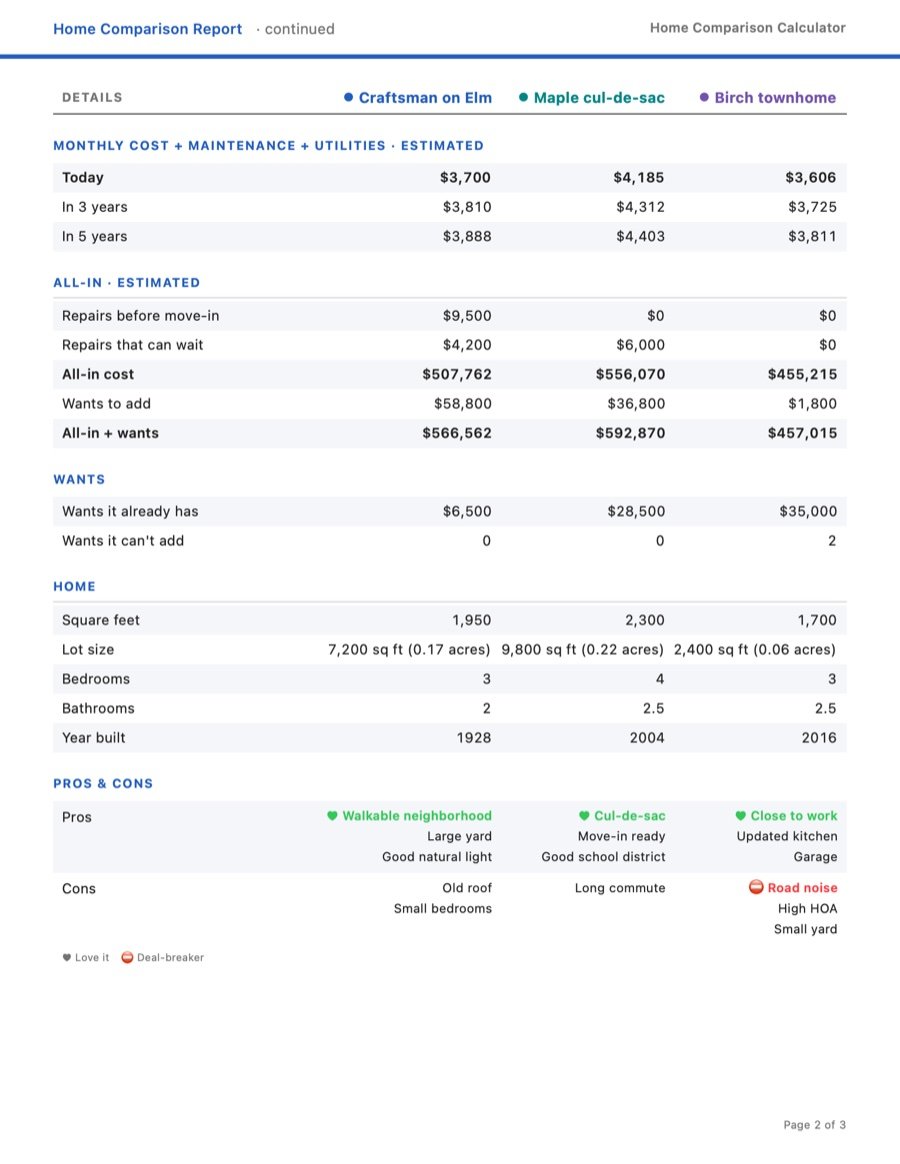
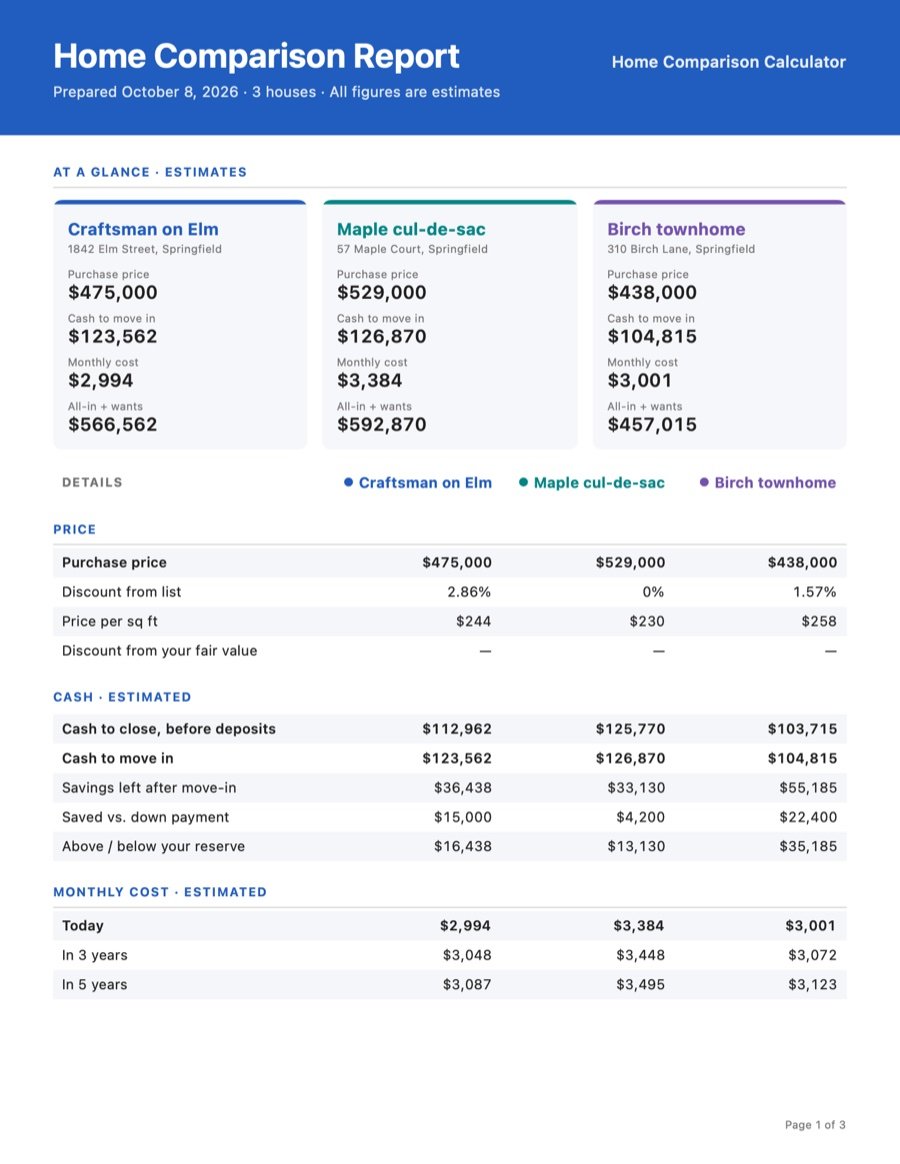
Share a PDF comparison report
Turn up to three houses into one clean report to share with a partner or agent, through your device’s own share options (email, messages, files and more).
- “At a glance” cards: price, cash to move in, monthly cost and all-in cost for each house
- Price, cash, monthly cost today and in 3 and 5 years, side by side
- All-in cost, repairs, wants, home facts, pros and cons, and your notes
- US Letter pages, ready to print
Included with the $4.99 unlock. See the full sample report (PDF, 3 pages)
Free to try, one price to unlock
| Feature | Free | Full version ($4.99, one time) |
|---|---|---|
| Houses | 2 | Unlimited |
| Each house’s full numbers | Yes | Yes |
| Side-by-side Compare | Price and cash to close | Every row |
| PDF comparison report | No | Yes |
No subscription. The purchase is made through the App Store.
Your data is stored on your device
No account, no sign-in, no ads and no tracking. The houses and numbers you enter are stored on your device and are never sent to EverReachCraft. On iPhone and iPad, addresses you type are sent to Apple Maps for address suggestions. Details are in the Home Comparison Calculator privacy policy.
Home Comparison Calculator: common questions
Is it free?
It’s free to try with up to two houses, including each house’s full numbers. A one-time $4.99 purchase unlocks unlimited houses, the full side-by-side comparison and the PDF report. There’s no subscription.
Which devices does it work on?
iPhone and iPad, from the App Store. An Android version is coming soon to Google Play.
Do I need an account?
No. There’s no account and no sign-in. What you enter is stored on your device and is never sent to EverReachCraft. Addresses you type are sent to Apple Maps for suggestions, and device backups and reports you choose to share are covered in the app’s privacy policy.
Does it tell me which house to buy?
No. It’s a calculator: it shows math based only on the numbers you enter, and doesn’t tell you what to buy or what you can afford. It isn’t financial, tax, legal or real estate advice.
Questions or problems: the Contact page. More house-buying math on the blog: Rent vs. Buy in 2026 and How Much Income Do You Need for a $1 Million Home? Other apps: Apps by EverReachCraft.
Disclaimer
Home Comparison Calculator is a calculator. It shows estimates based only on the numbers you enter. The app doesn’t tell you what to buy or what you can afford, and it isn’t financial, tax, legal or real estate advice. Although it is designed by a licensed CPA, using it does not create a CPA-client or other professional-client relationship. A lender, real estate agent, tax professional or attorney can confirm the numbers and terms for a specific home. See the Terms of Service for additional terms and limitations.