

General information only. This article isn’t accounting, tax, legal or financial advice, and reading it doesn’t create a CPA–client relationship. Readers use it at their own discretion.
At the end of a pay period, a foster care agency works out which children were with which foster parents, for how many days, at which level of care, and at which rate. Foster care payment tracking turns those answers into foster parent statements, the agency’s state billing and its margin. In some child placing agencies, those answers come from an Excel tracker that grew over the years.
This post walks through what foster care payment tracking involves for a child placing agency, from placements and rates to respite, Texas T3C add-ons and foster parent statements, and how our Foster Care Payments App handles each part. It’s general information about how the numbers fit together. Neither this post nor the app is accounting, tax, legal or billing advice, and the app doesn’t pay anyone. Each state and contract has its own rules.
What Foster Care Payment Tracking Covers
Foster care payment tracking connects four sets of records:
- Placements: which client is with which foster parent, from which date to which date.
- Levels of care: the level each client is at, and when it changes.
- Rates: for each level, the daily rate the agency pays the foster parent and the daily rate the state pays the agency, each with an effective date.
- Adjustments: respite, add-ons, additions and deductions for each foster parent.
The care payment for each line is the days in the period times the daily rate; additions and deductions come after. Most of the work is in the dates: a move in the middle of a period, a level change on the 9th, a rate that changed on the 1st, a respite weekend. Each can split one line into two or more lines with different dates or rates.
Placements, Moves and Discharges
A placement has a start date and, eventually, an end date. When a client moves from one foster home to another, the agency decides which home is paid for the move day. One rule some agencies use is that the old home’s last paid day is the day before the new placement starts, so the move day is paid once, to the new home. Some agencies also don’t pay the discharge day.
In a spreadsheet, these rules live in formulas and in the habits of the person entering the dates. In the Foster Care Payments App, each change (new placement, move, change of level of care, discharge) is entered from a date. As set up, a move ends the old foster parent’s pay the day before the new placement starts, and the discharge day is not paid. A different rule for an agency is a customization, quoted before work starts.
Levels of Care and Rates by Effective Date
State rates and an agency’s foster parent rates change from time to time, and not always on the same date. When a pay period spans a rate change, one level needs two rates in the same period.
The app keeps two rate histories for each level of care: the foster parent rate and the state rate. Each rate has an effective date, and a change can be entered ahead of time. When a pay period crosses a rate change, the days before and after are calculated at their own rates.
Respite: Who Is Paid?
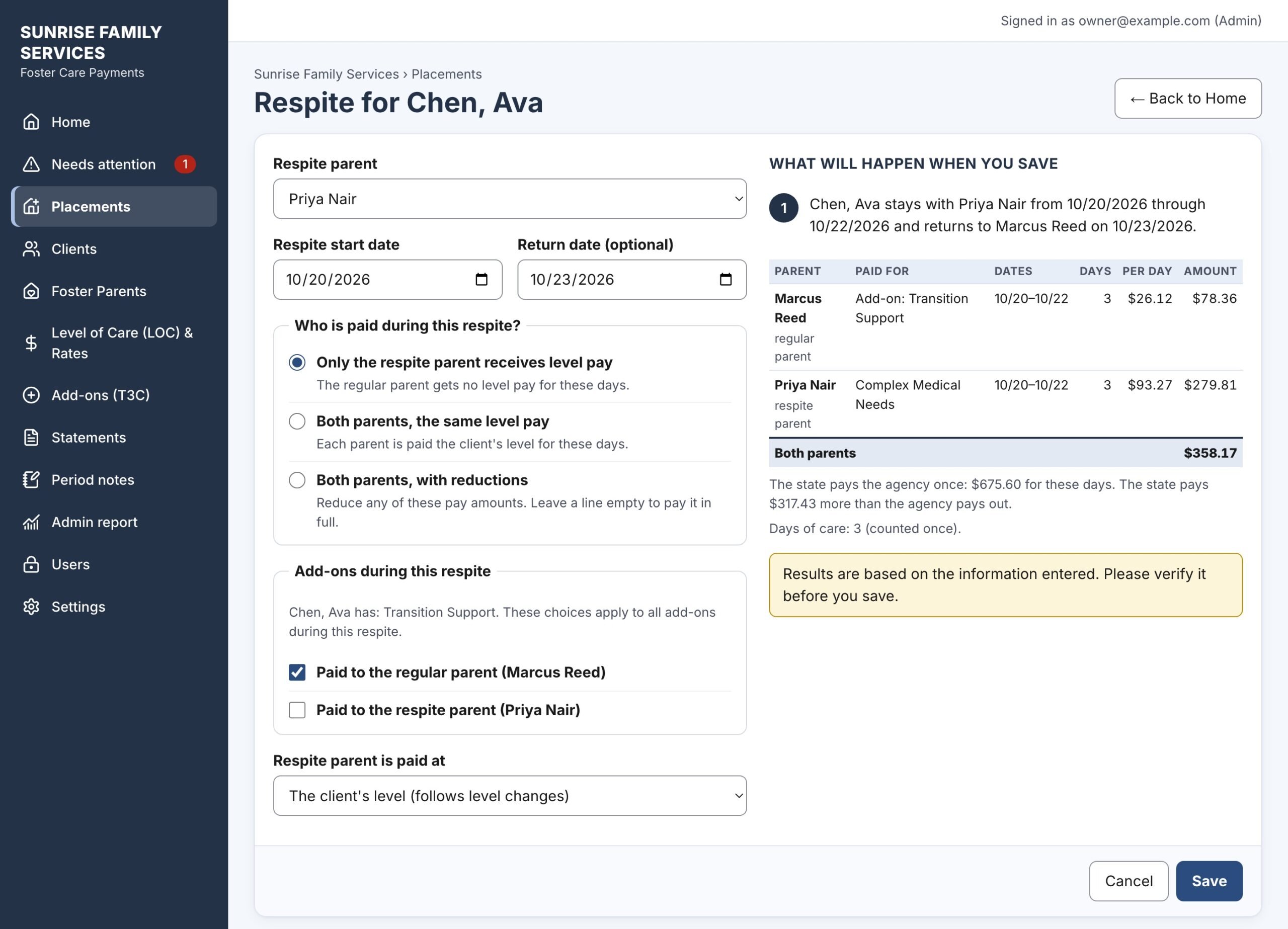
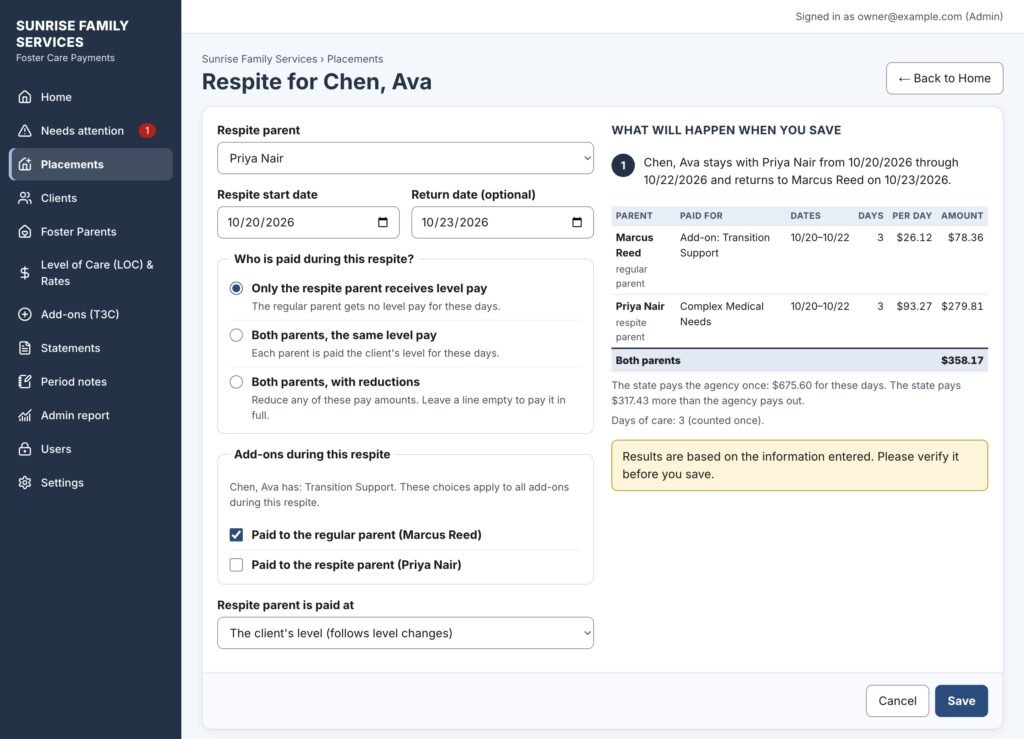
Respite is a short stay with another foster parent, and agencies handle it differently. In some agencies only the respite parent is paid for those days. In others both parents are paid, or the regular parent is paid at a reduced amount. The answer can vary from one respite to the next.
The app asks for each respite:
- Who is paid: only the respite parent, both parents at the same level pay, or both with reductions (an option the agency turns on in Settings).
- Whether add-ons stay with the regular parent, go to the respite parent, or both.
- Which level the respite parent is paid at: the client’s level or another level.
Before saving, the respite screen shows each parent’s dates, days, daily rate and amount, and what the state pays the agency for those days. A respite ends with a return date, or the client can stay with the respite parent as a new placement.
Texas T3C: Service Packages and Add-ons
Texas is moving foster care from Service Levels to T3C (Texas Child Centered Care) service packages, in phases. On the DFPS T3C rates page, each package has one daily rate split into a child placing agency retainage portion and a foster family home pass-through portion. For example, the page lists T3C Basic Foster Family Home Support Services at $83.29 a day: $36.39 agency retainage and $46.90 foster family pass-through.
DFPS states that only one primary service package rate applies per day of care. Add-on services are paid in addition to the package rate when the child receives a package through a child placing agency (except Short-Term Assessment Support Services), the agency is credentialed for the add-on, and the child is eligible. The add-ons listed on that page:
| Add-on service | Total daily rate | Agency retainage | Foster family portion |
|---|---|---|---|
| Transition Support Services for Youth & Young Adults | $37.40 | $11.28 | $26.12 |
| Kinship Caregiver Support Services | $38.22 | $38.22 | Not applicable |
| Pregnant & Parenting Youth or Young Adult Support Services | $51.22 | $24.94 | $26.28 |
Rates and rules change; the DFPS page has the current figures.
For payment tracking, this means one client can have a package and one or more add-ons at the same time, each with its own start and end date. Each add-on has a total daily rate and an agency retainage portion, and some add-ons also have a foster family portion (Kinship Caregiver Support Services has none). In the app, T3C add-ons are their own list: each add-on has a foster parent rate history and a state rate history, and each client’s add-ons have their own dates. On the foster parent’s statement, each add-on is its own line.
Foster Parent Statements
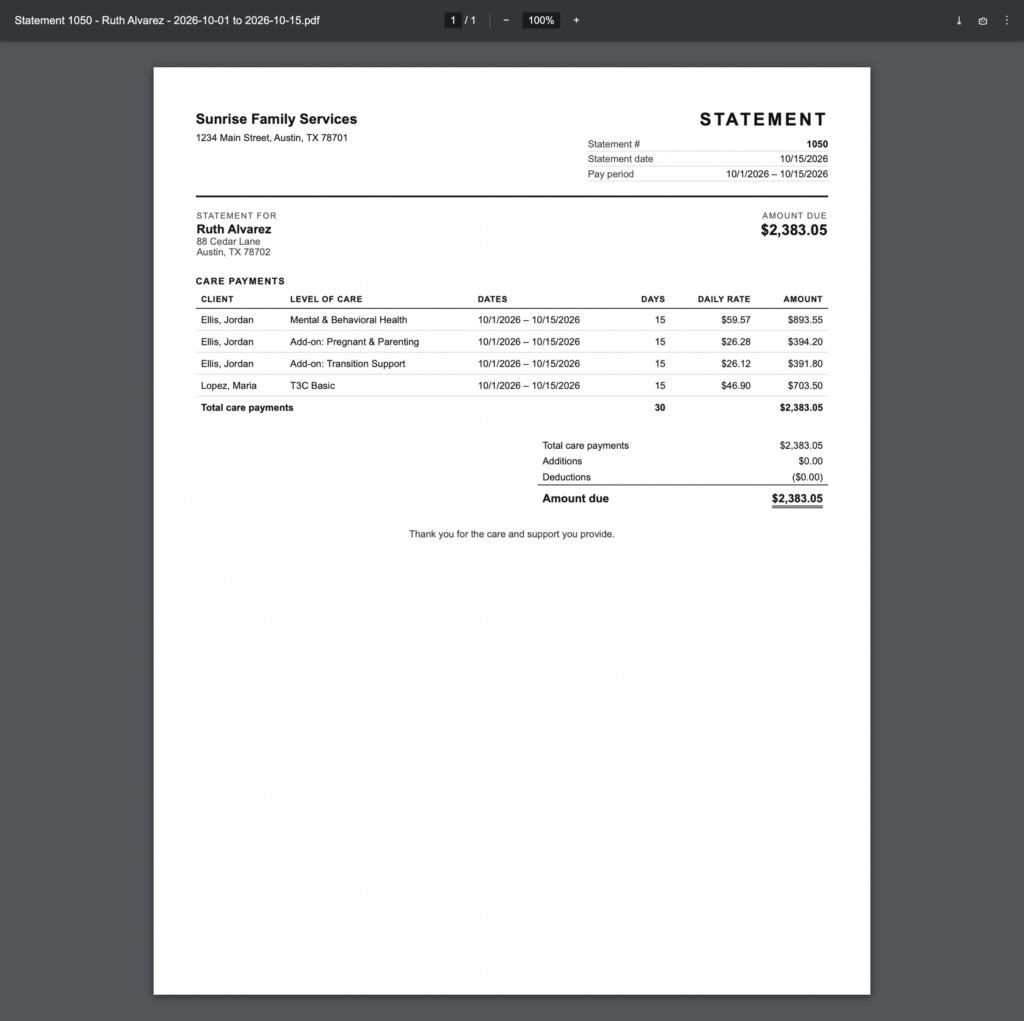
A foster parent statement shows each client, level of care or add-on, dates, days, daily rate and amount, then the total care payments, additions, deductions and the amount due. It shows the foster parent how the payment was figured.
In the app, a statement is made for a chosen foster parent and dates; pay periods default to twice a month or monthly. It’s emailed as a PDF from the agency’s own Google account, and a copy is kept when it’s sent. A balance a foster parent owes the agency is shown and can be deducted later. Admins can also run batch statements: choose the parents and dates, review each statement, then send. Period notes for a parent can print on the statement when the agency chooses.
State Reimbursement and Agency Margin
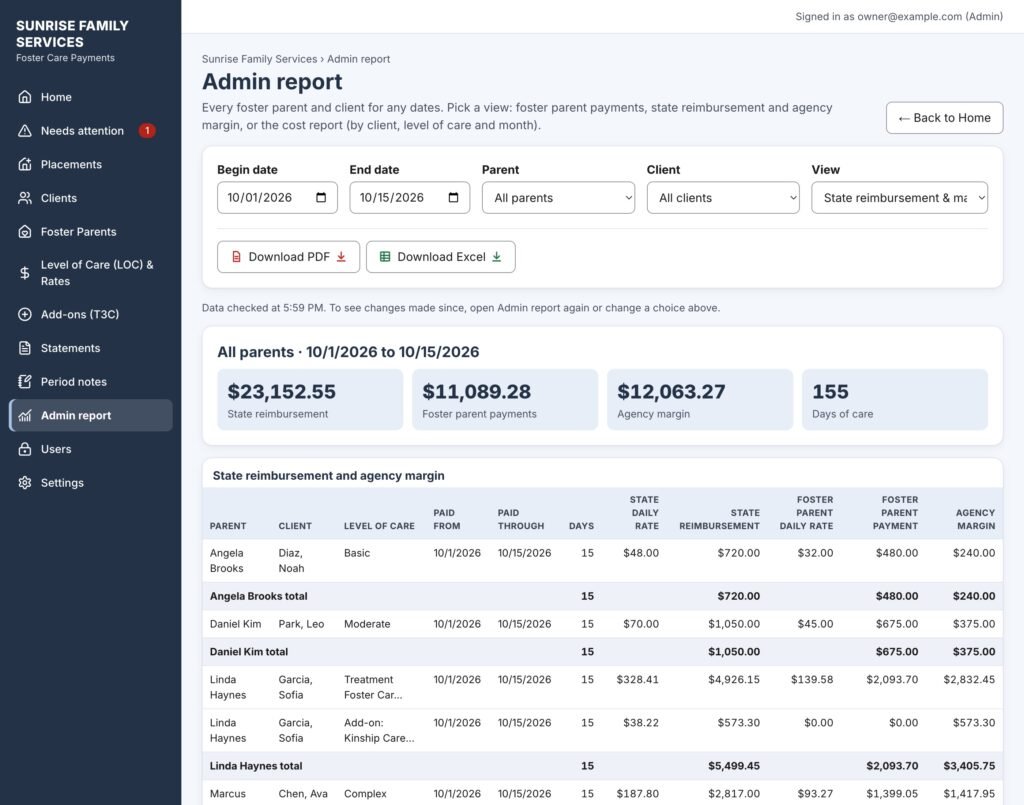
For the same days, the agency bills the state rate and pays the foster parent rate. The app’s Admin report calculates both from the rates and dates entered, and shows the difference as agency margin, before the agency’s other costs. It covers any dates you choose, plus a cost report by client, level of care and month, downloadable as PDF or Excel. The Home screen shows the current pay period at a glance: census, state payments, foster parent payments and agency margin.
Catching Problems Before Statements Go Out
Many payment questions trace back to dates: a placement entered twice, a gap between two placements, a level with no rate for some days, or a change made after a statement was already sent. The app’s Needs attention screen lists items it found to check, such as days that can’t be paid with the rates entered, days that may be paid twice, and changes after a statement was sent, with the amount sent and the amount now. The screen itself notes that it may not find everything, and results are based on the information entered.
About the Foster Care Payments App
The Foster Care Payments App is a web app built on Google Sheets and Apps Script. It’s set up in the agency’s own Google account, one Google Sheet per company, and staff open it from a bookmarked link. People sign in with an email address on its Users list, as Admin or Staff.
We customize each setup: the agency’s levels of care and rates, pay periods, name, address and logo on statements, and changes for the agency’s own rules, quoted before work starts. Existing records from an Excel tracker can be loaded at setup.
What it isn’t: it calculates and sends statements, but it doesn’t pay anyone, and it isn’t accounting software. It doesn’t connect to state portals or billing software. It runs within Google’s limits, such as daily email limits.
Pricing is by quote, through our contact page.